


Problems with Wireless connection on Acer Laptop?
If you are experiencing wireless issues with your Acer Laptop then the problem is going to be one of the following:
- A problem with your wireless connection itself
- Problem with Laptop settings
- Missing/ corrupt or outdated Acer Wireless Drivers
There are many different Acer wireless connection problems such as issues with Acer wireless keyboard, Acer wireless mouse, Acer Wireless optical mouse and even Acer wireless earbuds. If you are having problems with any of these devices, or other Acer wireless connections, then read the article below to troubleshoot and fix your Acer wireless problems.
The simplest and often most effective way to fix your wireless connection issues is to reboot your Acer device to see if that fixes the issue. If this reboot doesn’t work, then read on but it is always best to try this first.
You can also read our post which describes 6 easy Solutions to WiFi network not showing up.
If you wish to run a Drivers Scan for Acer Driver Updates, click here for more details. Alternatively, you can start your download below to run a Drivers Scan of your PC.
1. Problem with the Wireless Connection on your Acer PC
To rule out this problem you will need to try to connect using another device. If the wireless connection works for another device, then this is not the problem.
2. Problem with Laptop settings
It is often the case that the problem with your Acer Wireless connection is just that the ‘wireless’ button has been inadvertently turned off. Many users are unaware that the button is even there so it can often be switched accidentally.
How to enable Wireless Networking on an Acer Laptop
In some Acer models you can use a combination of keys on the keyboard to enable or disable wireless networking, in other models there is a wireless switch on the front or side of the laptop. There is a list in the section below of various models and where wireless toggle buttons can be located. These are either:
- A wireless button above the keyboard
- A toggle slider button on the front or side of the laptop
- The fn (function) key pressed in conjunction with another key showing the wireless icon on your keyboard. The Wireless icon will look like one of the images below …

Enable/ Disable Wireless on various Acer Laptop Models
- General Wireless toggle on/ off – fn+F5
- Acer Aspire 1000/1640Z/1690/2012 – toggle Keys above the keyboard
- Aspire 2000 Series – button to front of Laptop (apart from Acer Aspire 2010 – see note above)
- Aspire 3005 – button on lower right-hand side of laptop
- Aspire 5612 – button on the side of the laptop
- Aspire 9302 – blue button on the left-hand side of laptop
- Aspire 94xx – button found below the Lock key
- Aspire One – sliding button on front of laptop (where latch to open latptop would usually be) . If the LED light to the right of this button is on, then the wireless is on, if not, slide the button towards the antenna icon
- Extensa 2000/2500 Series – button above the keyboard
- Ferrari 3000/3020/3400/4000 – button on front of Laptop
3. Missing/ corrupt or outdated Acer Wireless Drivers
If, when you have ensured that the wireless connection is working and Wireless Networking is not disabled on your laptop, you are still having problems with your Wireless connection, then the problem is most likely with your Acer Wireless Drivers. Drivers need to be kept up-to-date and it may be that your Acer Drivers have become corrupt or are just out of date. If your issue is with Acer sound drivers, click here.
There 2 options in updating your Acer Wireless Drivers:
- search for, download and install the Drivers yourself, or
- you can use a Driver Update Tool to update the Drivers for you (and automatically keep all Drivers updated).
Both options will require an internet connection so you will need to use a wired connection in order to fix the wireless connection issue.
To manually install the Drivers you will need to make a note of the missing Drivers and download them from the Acer Website. You can then install the Drivers (there may be instructions for this on the Acer website).
You can also opt for automatic Driver updates. A Driver Update Tool will scan your machine to identify the missing Drivers and will then automatically download and install them for you.
Automatic driver update tools offer many benefits, the most important ones being:
- You can update device drivers automatically
- The software scans and updates all outdated or missing drivers at one go
- The tool picks the right drivers for your device and operating system, so you won’t have to worry about installing an incorrect driver by mistake
- Automatic driver updates are 100% safe
Driver Updater is one of the best driver update tools out there. Outbyte Driver Updater will give you access to a database of over 1 million drivers. It will regularly scan your PC, suggesting new driver versions to install. Driver Updater contains drivers for a variety of Windows devices. With just one click, you can update drivers in your system.
Step 1
Click here to Install and launch the app
Step 2
Scan all devices
Step 3
Install or update drivers automatically
You can download Acer Driver Updates manually or use a Driver Update Tool.
View our separate post here if you are having Acer Graphics Driver problems specific to Windows 10.
Bilal shah says
Hi I have got a big problem with my wifi, I have done everything in my power but still no look. In my wireless options there is no option for wifi, and I have updated my wifi adapter and it’s saying that the adapter is working fine, I dont understand why this has happened, recently I had my computer download Auslogics boostspeed from a computer guy, it worked fine for a day and then back to normal. Wifi still worked at that point, I went in to safe mode, and since that day the wifi has stopped working . Can you please help.
DriversExpert says
Can you see the wifi network from any other devices?
Nikesh Shrestha says
I was having a similar wifi problem. My Wifi displays other wifi network but I cannot see my network. I can use the wifi network in other devices.
DriversExpert says
so your wifi is showing on other devices but not your PC and your PC is seeing other wifi networks? Have you tried manually searching for the network? What are your PC specs?
em says
Hey, I have an acer aspire laptop, My problem is my function keys for wifi, I’ve tried turning it on and closes it, but when I open it up again, it will turn back off again, I’ve tried it like a thousand times but it won’t work, do you know the problem?
DriversExpert says
have you updated your operating system recently or installed any new software? Did it work ok before or has this always been an issue?
DriversExpert says
assuming you have made no recent changes or OS upgrades can you check your adapter switch?
Control Panel -> Network and Sharing Centre -> Change Adapter Settings
Here you will need to find your wireless adapter and ensure that it is enabled, if it is post more details here (such as OS, error messages etc) and we can look into it further…
Sk says
I have an Aspire R7-572…
It seems as though if I use the mouse, or do anything else on the right side (facing the system screen in the standard laptop position) that my arm (or whatever else) blocks the WIFI signal or weakens it. When I move my arm, it comes back. Even when I have the ethernet cable plugged in, it seems to happen.
It is a very strange anomaly… However, it is a consistent one (and has been that way since I purchased in 2013).
I am left to assume that ACER has a poorly placed antenna on the R7. AND, there is a magnetic property on the front of the system which makes me wonder if it is causing interference.
DriversExpert says
this is one I have never heard of before but am intrigued – will look into it! Have you contacted Acer?
Maree says
Hi,
I have the same problem. Just turned on the laptop this morning and there are no options to connect to wifi (just dial up option only).
I have uninstalled and reinstalled the driver (despite the tests showing the driver Atheros was not faulty). This hasn’t helped. I have also been able to connect to the wifi with my tablet device, so it isn’t a wireless connection problem.
I tried your idea of using the function key (on my laptop it’s F3) – it turned the wireless off and then on again. Still no change to the wifi availability though.
I have noticed that I also have Intel PROset on the computer, but I can’t seem to make it work – it doesn’t seem to be recognised under ‘network adapters’ in the device manager. I guess it needs a different card or something? Or maybe it just isn’t compatible or the correct software/drive…
This brings me to my question – do you think it might be a wireless card issue? I had my laptop serviced yesterday and perhaps they did something inadvertently? I would take it back to them, but there’s no-one there now who speaks English (there’s one staff member who does, but he roams between towns and left here this morning).
I hope you can advise
Cheers,
Maree
DriversExpert says
Hi Maree – I am assuming that before you sent your laptop in for service the wifi was working ok? Was any new hardware/ software installed since? It may be the case that the required driver has either become corrupt or is out-of-date (can happen if the OS is updated etc.)
I would suggest using the link on this page (http://www.drivers.com/update_acer_drivers_main/) to run a free drivers scan, this scan will tell you what, if any, drivers need to be updated. You can then search on acer’s website for these Drivers and download and install them if they are available. You can register the software to automate this if you prefer. If it is not a driver issue come back to us and we will look into it further
Maree says
Hi Drivers Expert,
Thanks for your speedy reply – I tried to submit answers to your questions, but then had to board a plane and it seems that my reply didn’t go through – so I’m attempting again.
I have done a driver scan and no problems were revealed. In fact, I’ve done this from a couple of different sites, with the same result of not picking up any problem with the wifi driver. I have also checked the properties of the Atheros driver through device manager, which claims: ‘This device is working properly.’
I had uninstalled and reinstalled the driver and there has been no change in the ability to find the wireless.
The service that was done was to find the cause of my battery not charging any more. The battery was replaced and it’s now charging, working well. While the laptop was being checked, they cleaned it and that was the extent of the service – no other installations have occured.
Hope these are adequate answers to your questions,
Thanks again
Maree
DriversExpert says
Hi Maree,
I think the easiest option if it is not the WiFi Drivers would be to setup your network connection again. If it is not showing at all in your network settings, then you will need to go to ‘add new network’ (depends on your operating system) – you will need the Wifi details (password etc. if enabled) for this – I hope this helps!
if you have any future laptop battery problems we have a good article on it at http://www.drivers.com/update/pc-health/why-is-my-laptop-battery-not-charging/
Gerda says
Hi There. I really hope you can help! I used my wireless connection for a very long time and all of a sudden it just stoped working. I can’t access the internet from my laptop at all so how will I be able to download the software or update? I have the acer aspire one and use my blackberry as a hotspot. I restored factory settings to see if that might help, but no luck. Please please help??
DriversExpert says
Hi Gerda- the wireless switch on the acer aspire one is either a slider on the front or it may be accessed via the “F2” or “F3” keys. Could this have been accidentally toggled?
Sid says
Hey Mate, thanks for such an easy guide, you just solved my problem, which no one I know could solve. Just wanted to thank you 🙂
DriversExpert says
Glad we could help and feel free to tweet about or ‘like’ the page if you found it useful!
pr says
Does the Aspire XC-6036, windows 8.1 support wireless internet? I see no switch, icon or key to enable it.
DriversExpert says
You can do the following to check if you have a wireless adapter installed:
1. Right click on My Computer > click on Properties
2. Select the Hardware tab
3. Click on the Device Manager button
4. Under ‘Network Adapters’ you will either see an adapter listed or, if there is no Wireless Adapter you will see 1394 Adapter and Ethernet adapter
Hope this helps!
Sheleuqar says
hello.. driver expert with this acer win7 the internet connection is so slow.. how can i speed it up? tenchu much..
DriversExpert says
Is the connection noticeably slower than on other devices using the same connection? Are you using wireless? If so, it can be worth restarting the modem/ router as a reset can help. Have you run a virus/ spyware scan recently?
Melissa Olivia says
Hi there, my acer aspire e15 was connected to the Internet a while ago, I allowed my sister in law to borrow it for her studies for 3 weeks and now it won’t connect to my home wireless broadband. My other devices connect to the home wireless network but I can’t seem to get this to work For my laptop. It won’t even connect to my mobile phones personal hotspot. I have tried everything and I’m exhausted now.
My sister in law claims to have not downloaded anything to the laptop but I don’t know w what to do at this point. Thanks!
DriversExpert says
Hi Melissa – it sounds like airplane mode may have been enabled on your acer laptop – have you tried toggling the relevant keys/slider switch (see details in article above)?
Nikki says
Hi can you please help I bought my daughter an acer aspire E15 for Christmas and the wifi was working fine until 3 days ago and now we have a wifi connection but it will not connect to the internet. I am at my wits end as I do not know what to do as she needs this for school work
DriversExpert says
Have you tried connecting other devices to the wifi? If the problem is not with the wifi then it is likely a wifi toggle switch either on the laptop itself or one of the function keys (details in article)
ELIJAH says
this laptop is lacking wireless driver what can i do?
DriversExpert says
You can run the free drivers scan using the download link – this will tell you the exact Wireless Drivers you need (there are many different ones) – you can then search for and install them yourself or register the software and let the program do it for you
eldho thomas says
nice and detailed explanation… gud job.. all the best.
Kate says
Same as one question above: Acer Aspire 4810TZG
Wifi has just stopped working. Noticed that my wifi button at top of the keyboard was not lit so thought the button had been toggled by accident. Tried to open it up again but cannot. I don’t have a function key option.
checked drivers and ran test – all OK.
Any other thoughts?
DriversExpert says
Hi Kate – have you rebooted since the problem happened? Is the connection definitely ok – have you tried connecting to the WiFi using another device?
Jordan says
My Acer E 11 won’t won’t load any web pages. My computer says I’m connected to WiFi but it won’t load anything. I tried connecting it via hard line but that won’t work either. All of my other devices work great on my network. Please help.
Jay-Cee says
My Acer aspire E1-531 has a problem with its wifi if i say conect it tells me windows is unable to connect why is that?
Jay-Cee says
My acer aspire wont connect with wifi, it say windows cant connect please help me why is that? I already turned my wifi on with F3 but it still don’t work.
debasis p says
My acer aspire 5740 showing wireless network but can not connect to it(though was working fine till last night). Troubleshoot says ” windows can not resolve wirelrss connectivity issue”. Wifi is put on by pressing the button at top left corner (next to bluetooth button)
Mikhail Pace says
my problem is that when I turned my laptop on this morning it wouldn’t let me search for any wireless connections. The wi-fi option is not even available, it just lets me connect with a an ethernet cable to the router, that a computer uses. I have no idea which driver I should install, because when I went to change my adapter settings there was only Ethernet and nothing else. What do I do to fix this problem. This has already happened another time, but at that time I turned of the laptop and turned it back on later that day, and everything was back to normal, meaning that I could connect to wireless connections.
Lauroo says
Hi,
I have an acer aspire E15, it has 3 accounts on it mine, my partners and guest. About a month ago it stopped connecting to the Internet (wifi or Ethernet), once I ran the virus scan and updated the firewall it started working again. My brother in law was using my partners account to watch sky go and got logged out. He didn’t know the password so went onto the guest account to watch sky go again. After this the Internet isnt working at all. Wifi or Ethernet. I have tried turning windows firewall off and on, it says my partners account needs verifying – but it won’t onnect to the Internet to do this.
Lance says
Hello, I’m having a serious problem with my laptop ACER Aspire One. It cannot detect nor find internet connection and even WIFI. The status is always unavailable. Please help thanks!
abel says
Hey there I’ve changed my windows XP into windows 7 professional and since the wifi don’t work no more I’ve try my best to make it work but it’s too hard it’s a acer notebook inspire one….
DriversExpert says
Hi Abel – this is most likely a Drivers issue as Windows 7 and Windows XP require different sets of Drivers – try the free Drivers scan (link in article above) – this will tell you if you have missing Drivers and provide you with their details
JASON says
Hi i have an acer travelmate 2490 its conects to to my wifi from my router but does not ask me for password ? so it is not connecting to the internet but connecting to my wifi ?
DriversExpert says
Hi Jason – it should be connecting to the internet via your WiFi – you may not have a password set up – have a look at the security settings as you should have one
S.SELVAKUMARAN says
My touchpad(Mouse) is not working on ACER GATEWAY NE56R LAPTOP.How to rectify the problem.
DriversExpert says
Has it recently stopped working? What does the Device Manager show?
John says
Hello,
I was wondering if you could help me out, I have a acer aspire v5 and the Internet connection is very bad I connected it directly to my router and it only has 11 download and 30 upload all other devices connected are working fine but my laptop does not I sent it In and they said they fixed it but they didn’t solve the problem I’ve been on countless phone calls with acer and nothing.
DriversExpert says
Hi John – is your internet connection good enough to run the Drivers Scan? Was your connection better in the past – if so, can you think of any changes (software install, updates etc.) since then?
Joseph says
My acer has always connected to my wifi but now is very temperamental. Mainly not pairing. I can find my wifi and I put in password but it won’t connect. All other laptops and phones do tho with no problem. I checked wifi switch but isn’t one. It’s FN + F3 (airplane mode) this is all ok also. Hope u can help.
Sarah says
Hey, I was hoping you could give me a little more help? I have a pretty basic acer laptop, it was my sister’s old one so I’m not sure on what style it is. (Windows 7) I got it riddled with viruses and got rid of most of them but I’m not sure if it could be part of my problem. But my problem is, at my fiance’s house, I can connect to one of their internet connections but not the primary one. All other devices can connect to it including his DS. The internet is pretty funky, it frequently connects and disconnects and it gets REALLY annoying REALLY fast. I tried the connection button thing and that wasn’t it. The only other advice I have gotten is to get a usb adaptor but I really don’t want to spend money unless I have to. Do you have any other advice? Sorry for the bother.
-Sarah
DriversExpert says
Hi Sarah – is your primary connection showing at all (or showing and not connecting?) – anything unusual in device manager?
Megan says
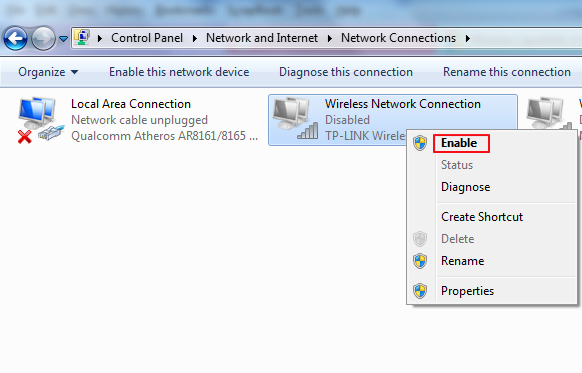
I’ve just had a similar problem with my Acer Aspire laptop (wireless was working fine then suddenly stopped and didn’t recognise any network, other devices working fine). Solved by going to network connections in control panel and right clicking on wi-fi,to change disable to enable. Don’t know how it happened, not the toggle key though.
Radha says
Hi!
I just bought an Acer Aspire E15 and I do connect to WIFI but after a while it gets lost. I can reconnect but this keeps happening every couple minutes and is very annoying. I do not have this problem with any other devices. Does anyone know what is wrong and how to solve it?
DriversExpert says
Hi Radha – this sounds like a power save issue. To fix this try turning off power save mode of the network adapter.
In the Device Manager click the ‘+’ next to ‘network adapters’, select your network adapter and click on the ‘advanced’ tab > select ‘power save mode’
and then click ‘off’, click ‘OK’
Please let us know if the problem persists at it may be an Acer Driver issue
Danzia says
Hi I’ve not been able to connect my computer with the wifi. It was working fine up until 3 hrs ago when bigot to work. My phone is also connected to this same network. I called acer support and he had me restore system settings, uninstall a driver. He also had me do the f3 to check airplane mode and also toggled the wifi on and off. The Internet still won’t connect
DriversExpert says
Can I clarify that it was working ok on home network but not on work one? I assume nothing was updated/ changed since apart from the action taken re- the Drivers? Can you tell us the model and OS
annetho says
I had slow wifi on my acer aspire e 15 for a couple years. I tried all the internet tips like power settings, updated the driver etc. Finally edited the wifi adapter settings and now it works properly for the first time. If only I’d have done it sooner. It may not work for you but might be worth a try. Good luck.
Steps:
Control Panel
System Device Manager
Qualcomm Atheros AR 956x Wireless Network Adapter
Right click / properties / advanced
Changed 3 settings:
Receive buffers to 512
(Ensure transmit buffers are also 512 )
Scan valid changed to 120
Wireless mode selection changed from 5 to 4 (don’t need b)
Save and close
Restart if no change
joseph says
i have the acer inspire one 533, and for some reason every time i click the wifi on the laptop it shows “no connections are available” and when i click trouble shoot, it says ” an error occurred while loading troubleshooter” the error code is ” 0x8007045A ” can you help me out?
DriversExpert says
Hi Joseph – was the wifi working previously? If so, did you install/ update any software recently? Do you have a firewall enabled?
Simranpreet Singh Makkar says
Hi there I had bought acer aspire e5511 laptop on January 2015. Its wifi is catching the signals and connecting to every wifi but from last week I am trying to connect to a wifi it is not connecting. After I enter the password and connect it says verifying and connecting and then says unable to connect to this network. It is not connecting even to a single wifi. Please help me too.
DriversExpert says
have you installed any firewall or updated security settings prior to this problem starting? any new software installations?
kamilo says
I have a strange problem. I connect my laptop to my router’s wireless network in, it says it will connect but says no internet access. I have tried:
-uninstalling AVG
-refreshing and renewing ip adress using ipconfig
-reseting router
-uninstalling and reinstalling wifi dongle drivers
-forcing plustnet’s dns adress
-disabling TCP/IPv6
-turning firewall off
PLEASE HELP!!!!!!!
driverhelper says
Hi Kamilo – can other devices connect to the same network? Have you tried a wired connection to see if that works?
APK says
Hi,
I have acer aspire 5325 laptop, I am not able to connect to my university wifi. It is not even being detected, if at all detected it doesnt get connected. I am able to connect to other wifis and through lan cable . I checked with my it administrator, he checked all the firewall settings and everything, still not able to detect the college network. Also I tried reinstalling my OS, but that neither yielded any result. Please help.
DriversExpert says
Hi APK – has it ever connected to the uni network? Is it password protected and if so, have you double checked the password (obvious I know but good to rule out!) What OS are you running and are you getting any error message or is it just not seeing the network at all (ever)?
APK says
Hi,
It previously used to connect to the university WiFi, now it at times detect it but not taking the security password. Rechecked the key several times, and using windows 7
APK says
At times it gets detected and it is not detected most of the times, none is able to identify the reason for this
just says
I have Acer netbook at first it s shown WiFi but its not connecting with mobile hotspot but now I downloaded atheros, broad com, Intel drivers but I installed. Later I dint find my wifi on notification bar also driver installed also have problem. Can you help me for solving this issue.
guy says
My acer aspire E1-572-6676 would connect to the internet fine and works really well. however when someone else uses their device on the same FLOOR of the house it disconnects from the wifi. When they are using it lets say in the basement the pc works perfectly fine (most of the time sometimes it disconnects with no one being in the house). This is a weird problem and i have been trying to fix this for a long time. I installed many drivers but nothing seems to work.
DriversExpert says
APK – have you tried entering the password directly into the network properties?
control panel > network and internet >network and sharing centre > manage wireless networks > properties > security (you can check ‘show characters’ to ensure the password is the exact same as you have types into other devices
– worth a try – let us know how you get on ….
DriversExpert says
Hi Just – is it seeing the wifi and just not connecting – what error are you seeing, if any?
DriversExpert says
Hi Guy – can I clarify – when you are connected on your acer and someone else connects to the wifi, you acer is cut off? If they are connected first and then you connect on the acer do they get cut off?
Shane says
Hi DriversExpert,
I recently bought a basic Acer One 14 model. I can connect to the internet (wifi) just fine, but it would lose its connection whenever I step out for a couple of minutes. I tried to do the first 2 steps you have suggested, but it still says No Networks Available even though my other devices are connected to the internet and working just fine. I can resolve this issue though by restarting my laptop but it’s incredibly frustrating! Hope you can help me. Thanks!
TechHelp says
Hi Shane – this may be a power management issue. Try the following:
Device Manager > Network Adapter > right click on the Wireless Adapter > Properties > Power Management > uncheck box “allow the computer to turn off this device to save power” > OK
Hope this works for you
MUhammad sajid says
I have problem with my Lap Top Acer Aspire E 14 Touch ( E5-471P-5984) i5 Win 8.1.
My Laptop is not detecting wireless network when it go to sleep mode and Wifi showing off when I am trying to on simply I can’t. Trouble shooting couldn’t find any problem. But when I restart my comp it’s all fine it not only detect the wireless network but also connect it automatically. I am really in trouble as I have to go restart my lap top and need to restore all my web site and open files again. It is started to happen just a month ago before it was ok I am using this since 6 months.
Kindly advise me what to do? Plz reply me via e- Mail. Thanks
Javen says
hi mr. expert,
i have a problem with my acer aspire e2. I can’t find in the settings where in i can turn the wifi on/off. It just suddenly don’t exist. When I look on wireless adapter in the control panel, there’s nothing in it. I don’t know hw to restore it. Hope for help.
DriversExpert says
Hi Javen – have you installed anything recently? Have you tried a reboot?
DriversExpert says
Hi Muhammad – did you install any new software/ OS or firewalls/ security prior to the problems starting?
Carol says
None of the things you said worked for me I had already updated the driver before and the wifi was working on my phone. My dad had helped me to update my driver before, but this time when I tried to update it, it wanted to download something that said it could “potentially harm my computer” so I canceled it. I don’t really know what to do now about how to fix this problem since that was the only one that had worked in the past. Please let me know if there is something I can do… Thanks.
DriversExpert says
if it is the driverdownloader.exe you are downloading it is fine to do so – the warning is basically for any download. The program will let you run a scan which will show you if drivers need to be updated. You can then search for the drivers yourself using the info from the scan.
chelsea says
I am connected to the internet but when I try to go to sites like Facebook and Gmail it won’t let me it says connection isn’t secure. I am able to Google search and go to other websites but not do email and facebook and other sites like that
DriversExpert says
What browser are you using? You may need to check the preferences – do you have a second browser installed that you can try it on?
Mary Jo says
I tried these steps on my Acer Aspire V and it worked! I wonder if the recent Comcast speed update had anything to do with having to adjust the driver settings? Anyway, I had wifi options but I could not connect to my home network all of a sudden. After rebooting the home modem it gave me limited access for about a minute before it cut off again. Thank you for these steps!
Ramy says
I have a very strange issue with my aspire e 15. I bought it recently & wifi while 1st setup was just fine & after 1st update I can still see my wifi network with same password entered but cannot connect, there was another option to enter security key instead of password but gave the same result.
I’ve just tried many ways of restoring previous status before update but while doing setup again I found the same issue while by using internet cable it becomes connected.
knowing that I can use my wifi network thru other several device except laptop !
Please give me a hand in this regard as I can’t just keep sticking to the router 🙁
Regards
DriversExpert says
Hi Ramy – are you getting any connection errors? Have you tried deleting wireless network and setting it up again?
Mr Magoo says
I just want to add that a faulty wireless card is a rare problem but it does occur…I just found my lack of wireless connectivity and failure to “find” any connections was due to a faulty card…problem resolved when another card was installed…please remember this possibility…cheers,Steve.
BSC249 says
I’m not sure this qualifies so much as a wifi issue or just a cheap crappy company, but I would appreciate your opinion:
I have an Acer Aspire V5-552G. It has a Qualcomm Atheros AR5BWB222 network card with the latest driver. I have Verizon Fios and use their router b/c as you probably know, without an IT & engineering degree it’s rather difficult to set up your own router in a home network with verizon. There are multiple other devices running on my home network at any given time and we never have any trouble.
This is why I think it may just may be a crappy Qualcomm network card: If I am in the same room as the router, the Acer laptop connects via the network card. If I stand in the next room, approx 15 feet, in direct line of sight, the connection drops. If I connect my Netis USB 300N wifi adapter, bingo – we have wifi again…
So here’s my dilemma, the Acer is my wifes laptop and she’s about ready to wrap it around my head because she runs into all kinds of trouble when switching between devices and doesn’t want to drag the usb device all over the house . Of course it doesn’t help that my Lenovo works just fine, anywhere… Do you think the problem is a crappy network card or crappy Acer design. I ask because I would simply buy another network card if that is the issue. Thoughts?
TY
ps- this is a common issue with acer laptops with the qualcomm network card. Those lucky few that got an acer with a broadcom card do not have the same issues. The acer community forums are rife with the stench of those qualcomm cards…
Justin says
Hi, i have the same problem.
I have an acer aspire e5-473 laptop. and my wireless is not working.
i have done all the possible troubleshoot with it but nothing is working.
I already uninstalled and reinstall my driver but still.
please help 🙂
Oliver says
Now this is my scenario. .laptop acer 5349
Made image (custom)from acer laptop with 2gb,250gb hdd, win7 home prem. and restored to bigger 500 gb Seagate hdd and added 4 more gb ram.
Everything went well..ram shows up ..hard drive good.
However. …there is no way to make wifi adapter to work. Ive read on the back of pc model of adapter..found drivers…installed and still cannot connect to internet. I can do with cable but not wifi. I can see network computers, router..thats not a problem.
So…how can we make this thing to work?
Basically this is the problem:
Old hdd with original acer aspire recovery -wifi works
Same recovery installed from ext hdd on new hdd -wifi doesn’t work.
Tried enable-disable,uninstall and still nothing.
DriversExpert says
Hi Justin – was it working ok before? Has anything changed? New software? Changed network?
Justin says
Hi, no. It is a new laptop. We bought it w/out an installed OS cause it is too expensive. I manually installed the os and i checked everything, all of the drivers are okay except for the wireless adapter. so i did some troubleshooting but it is still not working.
tina says
hello,
I have a problem connecting to wifi when my laptop is far from any router or mode it picks up the router but it wouldn’t connect.
do you have any idea what could be the problem and how to fix it?
georgia says
Hello! I just bought an Acer Aspire V17 Nitro and from the first time i open it I couldn`t connect to the internet. It shows that is connected to wireless (other devices are working conected to same wireless) but when i open internet explorer it shows “you are not connected to a ntework”.
Please help! What can i do? I called the service and they told me that i don`t have a guarantee because i bought it while i was in holiday, in another country.IEven if i bought it few days ago 🙁 . I am not a computer expert.
DriversExpert says
Hi Georgia – do you have a wireless mouse?
Can you try doing the following:
Device Manager > Network Adapters
double click on the wireless network adapter name
click ‘Advanced’ tab – what does this say? It can be worth trying changes here
Khristian says
Hey well my Acer won’t connect to the Internet it says that my connection is limited but all other devices work fine on the Wifi and it is the same when I tried to connect it by Ethernet
vamshidhar reddy says
hello sir ,
i am using acer Aspire E1-510 , i downgraded it to windows 7 and i couldnt find drivers , so now again i upgraded it to windows 8.1 pro ….. now all drivers are working except wifi drivers , when i try to install one, its saying error.cpp 1709 …. kindly please give the information sir …i tried all drivers from website also for wifi .. none is working
DriversExpert says
have you tried uninstalling and reinstalling the driver?
DriversExpert says
Hi Vamshidhar, can you go to Device Manager > Network adaptors and check network adapter drivers being used and what other options are listed
idan says
Hi,
I’m using an Acer Aspire Switch 10. Recently, I seem to just not be able to have wifi. I’m getting the “no wired connection” symbol while I don’t even have an Enthernet port on this pc.
I’ve seen you asked someone here if he updated his OS. Well, I tried to update to Windows 10 but encoutered some issues with low space amd such so I have up on it and still have 8.1 on it. And another thing, everytime I restart my pc (hoping this will fix the problem), Windows Update pops up and says I need to restart my computer to complete the installation of the updates. I do that, and nothing happens and the same window pops up saying the same thing again. Another thing was, following the fixes that were suggested here, I tried to press the Function key and the anthena key and it seems to just enable/disable Flight mode?
I really don’t know what to do and I need this pc for the Microsoft Office it came with.
Thanks in andvace, let me know if you need more details.
DriversExpert says
The best option here, as you had already started the update process, is to try to complete the update to Windows 10. Can you free up some space by moving bigger files/ photos libraries to an external hard drive?
Idan says
Do you think it will solve the problem? I’m starting to think I have a problem with the anthena or something.. Anyway, I’ll try to finish the process and let you know if it worked.
Thanks for the quick answer even though it’s more than a year old thread 🙂