


Last updated:
Many people spend money unnecessarily replacing laptop batteries when they may have fixed the issue with a simple battery reset or a Drivers update. If you are having problems charging your laptop battery, then reading this post may save you a lot of time, money and frustration!
The very first thing to check if your laptop battery doesn’t appear to be charging is the actual physical cables. Firstly make sure the power outlet you are connecting to is not the issue. You can do this by plugging in something else. If this other device charges then the power outlet is not the issue.
Laptop battery not charging – check the cables
The second thing to check after the power outlet is the laptop cables. This can often be the issue where a cable is damaged, or more often, not seated correctly in the port. Check all cables and also check the cable for kinks or damage which may be causing power issue to you laptop.
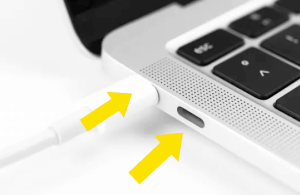
If you are on a newer laptop that charges via USB-C then make sure you are using the correct port.
You should also ensure you are using the correct cables, a USB-C charger for a phone for example may not have the wattage required to charge a laptop so use the cable that came with your laptop where possible.
Laptop battery not charging – overheating
If your laptop or power cable feel warm to the touch, plug out and leave for as long as it takes for everything to cool down. Then try charging again as your laptop may have become overheated, especially if left in direct sunlight.
Battery not charging – “0% available (Plugged In, Not Charging)”
With this error you may or may not see the charging light on your laptop, either way your laptop is having problems charging.
Batteries do have a finite lifespan (600-1000 charges/ discharges or about 2 years depending on intensity of use) and they can be very expensive to replace, so before throwing out that battery (in an environmentally-appropriate manner of course!), ensure that it has actually reached the end of its life and there isn’t some other problem preventing it from charging.
Windows 10 laptop battery charging issue
Some updates in Windows 10 have been know to cause the laptop battery to stop charging. There is a simple solution to this:
- go to Start > Device Manager
- select Batteries > you will see
Microsoft AC Adapter and
Microsoft ACPI-Compliant Control Method Battery - Right-click on each individually > choose Uninstall device (they will reinstall when you restart your laptop but always run a backup first just in case!)
- Turn laptop off and unplug the power cable
- If your model has a removable battery, then remove it and then replace
- plug laptop back in and power up
- check to see if the battery is charging
Fix 1: Battery Reset
To reset your laptop battery you will need to run the battery down completely. Make sure all work is saved as you will run the battery down until the system shuts off. When this happens you should plug in the power cable but DO NOT turn back on the laptop. Wait until you are confident the battery is back to a full charge again and then turn on your laptop.
If this method does not fix your recharging issue then you can try to fix or update your laptop battery drivers by uninstalling and reinstalling them (make sure to create a ‘restore point’ in System Restore before manually updating Drivers files). You can use a Driver Update Tool to keep all your Drivers up-to-date if you prefer not to attempt this manually.
Fix 2: Update Drivers
You will need to uninstall and reinstall the relevant device drivers via the Device Manager.
– Select Start > (right-click) My Computer > Properties
– Select the Hardware tab
– Select the Device Manager Button
– Under Batteries right-click “Microsoft ACPI-Compliant Control Method Battery” and click Uninstall
Your battery should no longer be visible in the Batteries list. To reinstall it you will need to:
– Select Action menu
– Select Scan for hardware changes
– Your driver should be listed again
You can use a driver update tool to automatically update your Drivers if you are unsure of which ones you require. Driver errors can also occur when the Driver is outdated. For this reason it is necessary to regularly update your Drivers. The easiest way to do this is by using a Driver update tool but you could also search for and download the drivers yourself.
Automatic driver update tools offer many benefits, the most important ones being:
- You can update device drivers automatically
- The software scans and updates all outdated or missing drivers at one go
- The tool picks the right drivers for your device and operating system, so you won’t have to worry about installing an incorrect driver by mistake
- Automatic driver updates are 100% safe
Driver Updater is one of the best driver update tools out there. Outbyte Driver Updater will give you access to a database of over 1 million drivers. It will regularly scan your PC, suggesting new driver versions to install. Driver Updater contains drivers for a variety of Windows devices. With just one click, you can update drivers in your system.
Step 1
Click here to Install and launch the app
Step 2
Scan all devices
Step 3
Install or update drivers automatically
Test your battery now and if there is still a problem charging, then it may have just reached the end of its’ days and it is time to part company!
Caterina Ray says
All of these suggestions have helped me out so much. Laptop not charging has been a big problem for me. At first I thought I would have needed a brand new laptop charger, but after reading this and trying it, I seemed to find out my problem. I just needed to update my drivers and now my battery is working as good as new! Thank you so much!
Julie says
Thank you SO MUCH. Have had constant problem using laptop-could not use it unless plugged into charger. You have saved me £30 + for new battery. It’s great being mobile again!!!!
Kind Regards
Julie
Ntuthuko says
thank you very much for dc knolwagde it saves me alot of money and time, it even help my clients when they bring their laptop i use to advice them that they must just change the battery, but now i do this process n charge them money. lol
nirav says
I have purchased lapcare battery for my acer 4736z. Initially I was using original acer laptop battery but now I am using battery from other manufacturer. I am facing problem in charging again once disconnected. I need to restart my laptop for connecting my charger to battery and charging it. Please let me know if only upgrading driver will solve the purpose or any other suggestion..
janardhan jethi says
my laptop battery not charging 100%,when it became 80% charge it showing not charging.
my laptop name sony vaio
if any one know then mail me or call me on +91 8951436660
Gajender says
thanx sir
Robin says
My battery will not charge and my computer will not turn on with out it even when my lap top is plugged in. I turn it off overnite,giving it enough time to recharge and when i turn on it lasts @30 seconds then shuts down. Do I need a new battry or a new laptop?
Robin says
Actually its my screen not turning on ??????????
DriversExpert says
Hi Robin – is the light on the ac adapter showing? Can you try another adapter to see if that is the problem? (go to local PC repair shop and they should let you try it out)
obaruyi friday says
pls help me out.
DriversExpert says
Hi Robin – so the laptop will not start even when plugged in to the mains? The first thing I would do is check the AC cable to make sure that was working. If that was faulty, the laptop may not have been getting any charge – do you have one you can borrow to rule this out? Some laptop connectors have a light to show if they are charging (on the actual cable). Please provide more details on the laptop type and age…
Curtis says
Hi I have an HP Pavilion dv7 and the battery is good i put it in another laptop to charger it. I have also replaced the ac adapter in the dv7 and it still won’t charge. I tried uninstalling and reinstalling the driver it didn’t work either. If u can get back with me it would be appreciated.
DriversExpert says
Hi Curtis – does the battery appear to be charging when plugged in or is there any error message? Try this:
– turn laptop off
– unplug the AC power and remove the battery
– then reconnect the AC power and turn laptop on again
– when boot is finished do a standard shut down of the laptop
– unplug the AC power and replace the battery, then reconnect the AC power
– when you turn the laptop back on and reboot the battery should charge again as normal
Please give us feedback if this works for you
Curtis says
Hi there is no error when it is plugged in and it doesn’t show it’s charging. I try taking the battery out and plugging the a.c. adapter in then turning it on the computer it doesn’t come on.
DriversExpert says
Did you try a Drives Scan? Does the report show the same HP Drivers you tried re-installing?
ajir says
thank you for your valuable article, my laptop’s battery is is charging now.
lots of thanks
Deepak says
Hi everyone
I tried all of these steps, but nothing seems to working.
It remains in 49% charge from over 2 hours.
Windows 7 is my primary OS and Ubuntu 12.04 is secondary.
It is not charging in win 7 from 46% of charge. So, I tested it in Ubuntu and there was no problem in charging.
So, after a little while, I switched back to window and same problem
Any help would be greatly appreciated.
My laptop is Lenovo G570
thanks
SaawaL bUkhAri says
thnkuuuUUuu y0u & <3…….
Danial AR says
You saved my live! 😀
achenjang junior brain says
thanks so much for your advice infancy it help me so much
Nuria says
I uninstalled the driver as indicated and now the screen turned blue all the way and windows will not load! Suggestions
DriversExpert says
Hi Nuria – can you go through what you did before this happened? Did you create a ‘restore point’ as suggested in the article?
Marie says
Hi I have just bought a brand new replacement battery for my HP Mini which is more powerful than the original battery, However, it is not charging. I went to Control Panel and clicked on Update driver but it is still not charging. Is it possible to install a new driver for this more powerful battery or do I need to replace it with the same power as the original. Thank you. Marie
gladwin says
Hi! I hve almost the same problem. I’m using a proline,it does not charge while I’m using it, bt when its turned off its charging up2 100% bt the LED lights are nt blinking to show that its charging. What can I do to fix this
JVC says
I used this method three times now where it from plugged in not charging to charging after I uninstalled driver then it was re-installed. But It will work until it gets to 99% charging then when it gets there it says the same thing goes from charging to plugged in not charging. I’m assuming I need a new battery. Ugh. However I did find my computer still works plugged in so will have to use this method until I have money for a battery.
SMASHLAND says
THANK U for helping people to not buy charger
maghat says
hi my laptop is is not charging.my ac adpter is new and battery is new if i pluged in the light is gloving but not charging
DriversExpert says
is the charging icon appearing? What laptop and operating system are you using?
Sayah says
Hello
after installing auto power on and shutdown my laptop lenovo turn on automatically even when i have deactivated the schedule and I have even uninstalled the program but still some times I see it is on.My laptop version is lenovo Z5070.What should I do?
DriversExpert says
Hi Sayah, as this is third party software it can be difficult to say exactly what the problem is but it sounds like it is not getting uninstalled fully. Did you uninstall via the control panel or just delete the program folder? What OS are you running?
Khaleel Ahmed says
Hi I have tried all the steps but still the charging shows 85% any advice.
DriversExpert says
How old is your battery? It may be just that it has started to deplete as there are a finite number of charges in any laptop battery …
Rishiraj says
sir,
i have a dell vostro 1320 laptop.
till now i was using original battery but it shows plugged in but not charging.
to sort this i buyed a new compatible battery but the problem remains same.
i have tried the method listed in your blog.but it dosent work..
what should i do??
DriversExpert says
ok – you need to rule out the power adapter as the problem – have you used different cockets/ power outlets to test? Do you have access to a second power cord that you can use to test if this is the problem?
Sara says
Hi
I have the same problem my laptop won’t open cuz my charger isn’t well…. Charging so I have a hp pavilion blue laptop and I tried to get the ax adaptor on and off its not working tried to take out the battery and put it again it’s not charging should I buy a new charger help!!!!
DriversExpert says
Hi Sara – is the laptop working ok when plugged in? Just the battery not charging? are there any lights on the ac adapter to show it is trying to charge? Does the laptop feel hot?
Sara says
No it doesn’t work while plugged in the wire of the battery is not charging and there aren’t lights on the ac adaptor but there is on her laptop and no the laptop doesn’t feel hot
Bryce says
Sir, my laptop says plugged not charging ad the battery level is stuck at 79%. When the AC adapter is unplugged the pc blacks out I.e. It is only running on AC and fails to boot on battery alone. My pc is Lenovo x230, intel i5, 64bit running windows 8 pro. I have already trying using other AC adapters but nothing. The machine was initially able to charge but just stopped suddenly. The battery and AC are both original lenovo x230 accessories. Please help!
DriversExpert says
have you tried the 2 fixes above? How old is the battery/ laptop?
Bryce says
Yes I have tried both fixes but still wasn’t able to resolve the problem. My battery and laptop are about a year old. The battery was lasting over 7 hours, so am wondering if such a powerful battery could just die overnight. I don’t know what to do next, help!
Bryce says
Its impossible to do fix 1 because the computer is unable to run on battery alone, and unable to charge nor discharge
Bryce says
Its impossible to do fix 1 because the computer is unable to run on battery alone, and unable to charge nor discharge
DriversExpert says
Hi Bryce – how old is the battery? Before the problem, did you leave your laptop plugged into the mains even when fully charged? Have you checked your battery settings? If set to maximum performance then try to select ‘energy saver’
Bryce says
The battery is a about a year old. Sometimes I did leave it plugged in depending on the intensity of what I was using it for at the time. I tried your recommendations but the laptop condition is the same.
Isabel says
I have a sony vaio laptop. I know the battery is almost drained i’ve had it for many years (8 years) and it’s still the same original battery. I bought a new ac adapter a few months ago. It was working fine but last week it kept blinking (the little green light that lets you know it’s on). The light stays on on the ac adapter when I turn the laptop on. As soon as windows starts loading the ac adapter light starts blinking and it shuts my laptop off. Once the computer is out the light is solid again. Do I need to replace the ac adapter, the battery and/or the power jack? Will greatly appreciate your help! Thanks in advance!
Ray says
I cannot uninstall Microsoft acpi-compliant control method battery. It always asks to reboot for effect. how can i fix this problem? windows 7 home edition 32 bit toshiba l500
DriversExpert says
what happens when you reboot – does it show again as before?
Marcus.Pejovic says
Hey I have an asus s500c and my laptop died about a week ago finally bought a new charger but when I plug it in it doesn’t show a light that it is being charged or anything so it won’t turn on at all any tips or suggestions??
TechHelp says
Do you mean no lights from the charger or the laptop?
Marcus.Pejovic says
From the laptop the laptop itself heats up like it’s charging but it won’t turn on or anything I don’t have any indication that it’s actually charging
DriversExpert says
do you have access to an external monitor to check if the monitor is possibly the problem?
Atif Javed says
I have hp laptop g2 and the problem is that in battery option it is showing pllugedin but not charging i have applied method 2 but it is of no use kindly help me
DriversExpert says
is this a recent problem? have you changed anything recently?
raj says
Hi Sir, I have Sony Vaio E-series VPCEA45FG,purchased this laptop almost 4 years back i.e.2011. Since till 2014 the Battery was fine as i normally prefer to use PC instead. For Almost 1 month i had not touched laptop and after this long time i switched back on laptop it shows green power light and after couples of minutes it showing red light in flash and suddenly laptop don’t even start when when i have plug into the charging,went sony centre motherboard dead got repaired but battery not got charging thereafter. I have changed brand new battery thought previously may be dead.But new one also got stuck. When I charge it showing charging for quite few seconds after stops at 0%charging for unlimited time(tested charging time 22hrs not reaching 1% even.) Vaio care(software) says the battery health status EXCELLENT for both new and old batteries.Don’t know what’s the problem. I have gone to Device Manager also uninstalled Microsoft ACPI Compliant Control Method Battery and Re-installed,updated also.None helped.I have Windows 10 installed recently but problem occur even in Windows 7.Please Help me with this. Thank you in advance.
DriversExpert says
Hi Raj – can you get a hold of another av adapter to see if that is the problem? If you don’t know anyone with one your nearest Sony shop should let you try one out
linda says
hello my laptop battery is not working therefore the laptop time is wrong etc im using the laptop by the electric will having no battery stop me from printing things out
DriversExpert says
Hi Linda – the time should be correct anyway and the battery problem shouldn’t impact this. Did you just start having battery problems recently? Have you any battery time at all and how old is it? The printing should work just fine as should all other functions whether on battery or mains power
suman says
I have purchased lenovoG500s about an year ago. but not used so much even then battery is not working. PC gets switch off immediately. plz suggest me or the shopkeeper has cheated me.
DriversExpert says
Hi Suman – does it work ok when plugged in? What % is the batter showing after being plugged in a for a few hours? Does it increase?
Ganesh says
Hi Lee,
My laptop was working fine until recently, Then just before a week or so it started getting stuck on the first usage of the day. After giving a restart it was running fine. But suddenly yesterday, my laptop did not turn up. I plugged in and it turned on. It showed “11% available (plugged in but not charging)”. And when I removed the power cord, it blacked out. Today also i am facing the same problem. But it is showing “0% available (plugged in but not charging)”. The Led light is showing up. It is orange when i turn my lappie on, then after 5 secs it turns white and when i start using the system, it is still white but blinking.
Mine is a 10 month old HP laptop. I use it daily for 7-8 hrs and I do charge it while in use.
EveM says
Hello,
I am having a similar issue. My battery is not charging when plugged in. I have replace the battery, and it still will not charge. The laptop works just fine from AC only. I have uninstalled and reinstalled the Battery driver, but it still is not working. Currently, the batter is plugged in, but there is an red X on the battery icon which indicates that a battery is not plugged in, but when I click on the battery icon it says plugged in and charging.
Please assist.
DriversExpert says
Hi EveM – when you replaced the battery was the ‘x’ icon showing from the start?
Can you try:
– Remove the battery
– Plug in the AC power and turn laptop on
– Turn off laptop
– Insert the battery, making sure it is clicking exactly into place
– Reboot
DriversExpert says
Hi Ganesh – have you tried another power cord to see if that has been damaged in some way?
Priyanka says
Hi,
I also faced the same issue on Windows8 on Lenovo G50-30 laptop – “Plugged in,but not charging”. It was solved by following the below steps :-
1) Click on the upper arrow button , available on Task bar at bottom of the desktop.
2) Click on “Energy Manager” option
3) Then select “Settings”option and make sure that “Conservation Mode” option is set as “OFF”.
On following the above steps, the issue is resolved now.