Drivers.com

follow us:

facebook twitter
  • Home
  • Download Drivers
  • Drivers Help
  • PC/Mac Resources
  • Software Drivers
  • Mac Fixes and Tips
  • PC Fix Tips
  • Security/ Backup
  • Tablets & Smartphones
  • Tech News
  • Software Drivers
  • Mac Fixes and Tips
  • PC Fix Tips
  • Security/ Backup
  • Tablets & Smartphones
  • Tech News

Resources by Tag

acer

Update Acer Graphics Drivers in Windows 10

Problems with Acer Graphics Drivers?

Acer Graphics errors can often occur after an upgrade to Windows 10. If your Acer Video or Graphics Drivers are not causing problems or not working properly, this may be because the Graphics or Video Drivers are not compatible with Windows 10.

Update Acer Drivers

Has your screen become distorted with unusually big user interface or other strange appearance? Maybe your Acer computer is crashing or freezing? Have you seen the error “Display driver stopped responding and has recovered”?
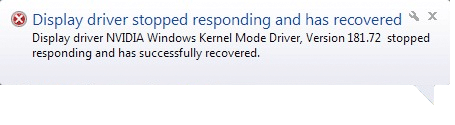
nvidia display driver error

If you suspect the problem is with your Acer Graphics Driver then you need to update your Graphics Driver, you can do this either manually or use a Driver Update Tool if you are short on time or computer experience.

  1. Update Drivers using Windows Update or from Acer Website
  2. Download Driver Update Tool for automatic Acer Driver Updates
Acer Wireless Networking Not Working?

1. Update Drivers using Windows Update

Browse to Start > Settings > Update & security

Select Windows Update > Check for updates
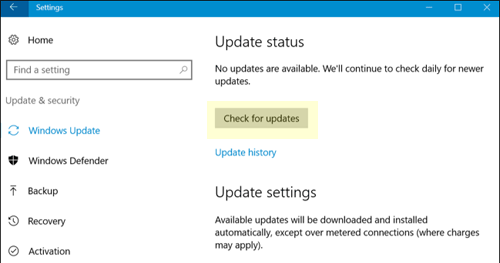
windows update check for updates

If Windows 10 finds an updated Driver you will be shown a link to click, otherwise no updates were found and you need to either try the Acer website or use a Driver Update Tool.

2. Download Driver Update Tool for automatic Acer Driver Updates

If you are unable to find updated Acer Graphics Drivers then you may need to use a Driver Update Tool. This can also be a useful option to save time and get all your Driver updates in one place.

Automatic driver update tools offer many benefits, the most important ones being:

  • You can update device drivers automatically
  • The software scans and updates all outdated or missing drivers at one go
  • The tool picks the right drivers for your device and operating system, so you won’t have to worry about installing an incorrect driver by mistake
  • Automatic driver updates are 100% safe

Driver Updater is one of the best driver update tools out there. Outbyte Driver Updater will give you access to a database of over 1 million drivers. It will regularly scan your PC, suggesting new driver versions to install. Driver Updater contains drivers for a variety of Windows devices. With just one click, you can update drivers in your system.

Step 1
Click here to Install and launch the app

Step 2
Scan all devices

Step 3
Install or update drivers automatically


Start Download


Filed Under: Software Drivers Tagged With: acer, drivers, Windows 10

How to fix Windows 10 problems in Acer laptops?

Acer laptop users have reported several problems after upgrading to Windows 10. We are discussing some common Acer problems with upgrading to Windows 10 and the solutions to these problems.

Update Acer Drivers

ELAN Touchpad is not working after upgrading to Windows 10

To resolve this issue, you need to uninstall and reinstall the Touchpad Drivers by following the steps given below.

  1. Press Windows key + X
  2. Select Device Manager from the list
  3. Look for Touchpad Drivers in the Devices list
  4. Right-click the Touchpad device and select uninstall
  5. In the uninstall dialog, select the option to delete the Driver package from the system. This causes it to delete the older Driver package that was installed
  6. Go to the Action menu in the Device Manager; select the Scan for hardware changes option. This will cause the operating system to reinstall the Touchpad Drivers
  7. Once the Drivers are installed, close all windows and restart your laptop

If the above-mentioned troubleshooting method does not resolve the issue, you need to look for the latest Touchpad Drivers on the Acer website. If there are no Touchpad Drivers for Windows 10, you need to download Windows 8 Touchpad drivers and install them in compatibility mode. Below are steps you need to follow for this:

  1. Download Windows 8 Touchpad drivers from the Acer Website
  2. Right-click on the driver setup file and click on Properties
  3. Click on Compatibility tab
  4. Check the box ‘Run this program in compatibility mode for’ and select Windows 8 from the drop-down menu and proceed with the installation
  5. Once the Drivers are installed, restart your laptop

HDMI port not working after upgrading to Windows 10

One of the reasons for this HDMI issue is compatibility issues with Graphic Card Drivers. Installing Graphics Card Drivers in compatibility mode is a recommended solution for this issue. The steps you need to follow for this are set out below:

  1. Go to Desktop and type run programs in search box
  2. Select Run programs made for previous versions of Windows
  3. Click Next
  4. Select the program you want to install in compatibility mode
  5. If you do not find the program in the list, select Not listed
  6. Select Next and follow on-screen instructions

If you are facing problems while performing the steps given above, you have the option of changing compatibility settings manually by following the steps set out below:

  1. Go to Desktop and type the name of the program
  2. Select the program from the list of results and click on Open file location
  3. Right-click on Program icon and select Properties > Compatibility tab
  4. In the next screen, select Change Settings for all users
  5. Provide admin name and password when prompted
  6. Select OK

Filed Under: PC Fix Tips Tagged With: acer, Windows 10

Acer Wireless Networking Not Working?

Acer Wireless Networking Not Working?

Problems with Wireless connection on Acer Laptop?

If you are experiencing wireless issues with your Acer Laptop then the problem is going to be one of the following:

  1. A problem with your wireless connection itself
  2. Problem with Laptop settings
  3. Missing/ corrupt or outdated Acer Wireless Drivers

There are many different Acer wireless connection problems such as issues with Acer wireless keyboard, Acer wireless mouse, Acer Wireless optical mouse and even Acer wireless earbuds. If you are having problems with any of these devices, or other Acer wireless connections, then read the article below to troubleshoot and fix your Acer wireless problems.

The simplest and often most effective way to fix your wireless connection issues is to reboot your Acer device to see if that fixes the issue. If this reboot doesn’t work, then read on but it is always best to try this first.

You can also read our post which describes 6 easy Solutions to WiFi network not showing up.

If you wish to run a Drivers Scan for Acer Driver Updates, click here for more details. Alternatively, you can start your download below to run a Drivers Scan of your PC.

Start Download

1. Problem with the Wireless Connection on your Acer PC

To rule out this problem you will need to try to connect using another device. If the wireless connection works for another device, then this is not the problem.


2. Problem with Laptop settings

It is often the case that the problem with your Acer Wireless connection is just that the ‘wireless’ button has been inadvertently turned off. Many users are unaware that the button is even there so it can often be switched accidentally.


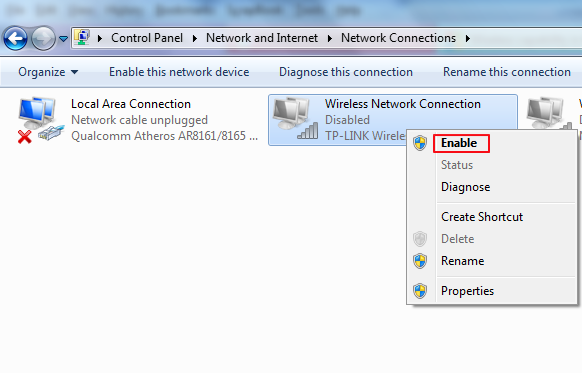
 How to enable Wireless Networking on an Acer Laptop

acer wireless disabled

In some Acer models you can use a combination of keys on the keyboard to enable or disable wireless networking, in other models there is a wireless switch on the front or side of the laptop. There is a list in the section below of various models and where wireless toggle buttons can be located. These are either:

  • A wireless button above the keyboard
  • A toggle slider button on the front or side of the laptop
  • The fn (function) key pressed in conjunction with another key showing the wireless icon on your keyboard. The Wireless icon will look like one of the images below …
acer wireless icons

Enable/ Disable Wireless on various Acer Laptop Models

  • General Wireless toggle on/ off – fn+F5
  • Acer Aspire 1000/1640Z/1690/2012 – toggle Keys above the keyboard
  • Aspire 2000 Series – button to front of Laptop (apart from Acer Aspire 2010 – see note above)
  • Aspire 3005 – button on lower right-hand side of laptop
  • Aspire 5612 – button on the side of the laptop
  • Aspire 9302 – blue button on the left-hand side of laptop
  • Aspire 94xx – button found below the Lock key
  • Aspire One – sliding button on front of laptop (where latch to open latptop would usually be) . If the LED light to the right of this button is on, then the wireless is on, if not, slide the button towards the antenna icon
  • Extensa 2000/2500 Series – button above the keyboard
  • Ferrari 3000/3020/3400/4000 – button on front of Laptop

3. Missing/ corrupt or outdated Acer Wireless Drivers

If, when you have ensured that the wireless connection is working and  Wireless Networking is not disabled on your laptop, you are still having problems with your Wireless connection, then the problem is most likely with your Acer Wireless Drivers. Drivers need to be kept up-to-date and it may be that your Acer Drivers have become corrupt or are just out of date. If your issue is with Acer sound drivers, click here.

There 2 options in updating your Acer Wireless Drivers:

  1. search for, download and install the Drivers yourself, or
  2. you can use a Driver Update Tool to update the Drivers for you (and automatically keep all Drivers updated).

Both options will require an internet connection so you will need to use a wired connection in order to fix the wireless connection issue.

To manually install the Drivers you will need to make a note of the missing Drivers and download them from the Acer Website.  You can then install the Drivers (there may be instructions for this on the Acer website).

You can also opt for automatic Driver updates. A Driver Update Tool will scan your machine to identify the missing Drivers and will then automatically download and install them for you.

Automatic driver update tools offer many benefits, the most important ones being:

  • You can update device drivers automatically
  • The software scans and updates all outdated or missing drivers at one go
  • The tool picks the right drivers for your device and operating system, so you won’t have to worry about installing an incorrect driver by mistake
  • Automatic driver updates are 100% safe

Driver Updater is one of the best driver update tools out there. Outbyte Driver Updater will give you access to a database of over 1 million drivers. It will regularly scan your PC, suggesting new driver versions to install. Driver Updater contains drivers for a variety of Windows devices. With just one click, you can update drivers in your system.

Step 1
Click here to Install and launch the app

Step 2
Scan all devices

Step 3
Install or update drivers automatically
 

Start Download


You can download Acer Driver Updates manually or use a Driver Update Tool.

View our separate post here if you are having Acer Graphics Driver problems specific to Windows 10.

Filed Under: Software Drivers Tagged With: acer, drivers, network, wireless

Acer Sound Card Problems?

Are you having problems with you Acer Sound Card?

If you are having problems with your Acer Sound Card then the following check-list should help you get to the bottom of the issue:

Download Acer Aspire Sound Drivers
  1. Make sure that the volume is not muted. This may seem obvious but we see this mistake happening on a regular basis
  2. If you are using external speakers, check all the connections and ensure they are plugged into the correct jack
  3. Has your sound worked in the past? If so, try to remember the last time it worked and anything you have done/ installed since. If you are unsure about any software you have installed since, run a virus scan and uninstall if necessary.
  4. If the sound card problem started since upgraded to a new Operating System then the problem is almost certainly with your Acer Audio Drivers, click here to read more on Acer Drivers problems >>
  5. Have you updated your Acer Sound Card Drivers recently? If you cannot remember updating your Drivers, you can run a Free Acer Drivers Scan, you can opt to register for automatic updates if necessary.
Acer Wireless Networking Not Working?

If you are still having problems with your Acer Sound Card, please post your question in the comments section below.

Filed Under: Software Drivers Tagged With: acer, audio-sound


  • Recent Posts
  • Popular Posts
        

Read More Posts


Read More Posts

Drivers.com Sites

  • Software Drivers
  • Drivers Ed

About Us

  • Advertise
  • About Drivers
  • Drivers Support
  • Drivers.com Privacy Policy
  • Disclaimer
  • Software Drivers
  • Mac Fixes and Tips
  • PC Fix Tips
  • Security/ Backup
  • Tablets & Smartphones
  • Tech News

© Copyright 2026 PDE Publications Ltd. End User License Agreement (EULA)