
Drivers.com

follow us:

facebook twitter
  • Home
  • Download Drivers
  • Drivers Help
  • PC/Mac Resources
  • Software Drivers
  • Mac Fixes and Tips
  • PC Fix Tips
  • Security/ Backup
  • Tablets & Smartphones
  • Tech News
  • Software Drivers
  • Mac Fixes and Tips
  • PC Fix Tips
  • Security/ Backup
  • Tablets & Smartphones
  • Tech News

Resources by Tag

realtek

Fix Realtek Audio Drivers for Windows

Realtek is one of the most common audio Drivers which comes packaged with many computers and laptops. Realtek Drivers are usually responsible for delivering sound/audio to your PC. As with all drivers, Realtek Audio Drivers can have issues and problems with installation. The article below will help you to fix Realtek Audio Drivers for Windows.

These Driver problems can usually be fixed by downloading Audio driver updates, reinstalling the Audio Driver or using a Driver Update Tool to fix the Drivers for you.

Download Realtek Audio Drivers through Windows

You can download Realtek audio drivers or updates through Windows by following the instructions set out below:
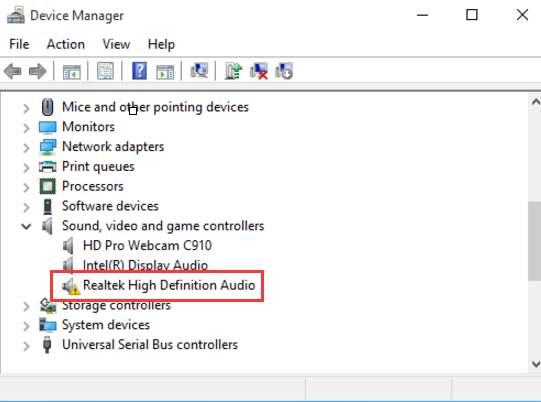
realtek audio-driver

– Open Device Manager > Open Run dialog box(Windows key + R)
– Enter devmgmt.msc in the run dialog box
– Click to expand Sound, video and game controllers > right-click on Realtek High Definition Audio
– Select Update Driver Software
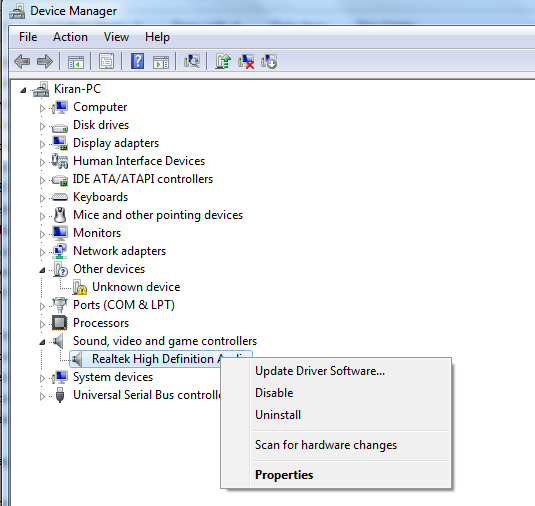
update driver software

– Select Search automatically for updated driver software
– you will then be advised as to whether or not you need to update your drivers
– If new drivers are installed you will need to restart your machine

How to fix Realtek Audio Drivers for Windows

As well as Realtek Driver errors, which can be resolved easily using a Driver update tool, there are many other Realtek audio errors that you may come across. To Fix Realtek Audio Drivers for Windows read the solutions below or download a driver update tool (download link at end).

One of these errors is ‘Realtek digital output has no sound‘ where users are not getting sound from their computer-connected speakers. Digital output usually refers to high definition digital audio devices connected to your computer (often a smart TV or a home theatre system). Click on the link above if you are having issues with Realtek Digital Output.

There are also many Realtek error codes that you may come across (such as 0x000005b3 Error or 0xE0000227 Error), click here to view a list of these errors and their meaning.

If you need to reinstall Realtek audio drivers then you will find help in the post ‘How to Reinstall Realtek HD Audio Manager‘, this will be very helpful if you are seeing the ‘Realtek audio manager is not found error‘.

Automatic Realtek Driver Updates

If you are having difficulty updating your Realtek Audio Drivers, and can’t get the relevant driver from the Realtek Drivers site then you can use a driver update tool to automatically update the Drivers for you and keep them up-to-date.

IMPORTANT NOTICE: Downloading the latest Driver releases helps resolve Driver conflicts and improve your computer’s stability and performance. Updates are recommended for all Windows 11, Windows 10, Windows 8, Windows 7, XP and Vista users.
Start Download

Filed Under: Software Drivers Tagged With: audio, audio drivers, realtek, sound

Realtek HD Audio Drivers

realtek audio driver manager

Realtek is a Taiwanese company with a strong focus on Audio Devices and thus Audio Drivers. These Audio Drivers interact with the sound card of the computer in order to produce sound. Audio Drivers are constantly  updated and it is therefore very important to ensure you have the latest version of Audio Driver installed to enable the smooth-running of your audio devices.

How to Reinstall Realtek HD Audio Manager

Realtek is probably best known for AC’97 Audio Drivers but HD Audio Drivers have now replaced AC’97 and are far more advanced. HD Audio Drivers produce higher quality sound and are compatible with Windows 2000, 2003, XP, Vista, Windows 7 and Windows 8. HD Audio Drivers also support endless formats of sound and have a high frequency bandwidth and possible speech recognition. Since 2014, the latest version of HD Audio Drivers is 2.75.

Various errors can arise when trying to configure your Audio Drivers and installing the latest Sound Driver updates. It is important to understand what each of these errors mean, enabling you to troubleshoot the problem. Below are some common errors that often occur when dealing with HD Audio Drivers.

Common HD Audio Errors:

0001 Error

The main reason for Error 0001 occurring is damage to the windows file system. Incorrectly deleting applications or hardware and deleting any incomplete installations usually results in system file errors. Shutting down the computer improperly or recovering the computer from spyware etc. can also result in system files being corrupted. These corrupted files can cause problems for applications seeking system file information.

0101 Error

This error usually arises when the operating system becomes corrupted. Other reasons can be the presence of spyware, malware and programs not installing properly. Over time all these issues build up in the registry which slows down other programs, preventing them from starting or working efficiently. After a while your PC will start to experience lag and irregular crashes.

0xE0000227 Error

This is a common error in Windows XP and can occur during the installation process. This driver issue causes the installation to freeze. Previously installed incorrect Drivers can also cause lead to this error.

0x000005b3 Error

This error indicates a problem during Driver installation. While updating or installing the Audio Driver, if the currently installed Driver is either corrupt or partly uninstalled, it will cause a problem with the installation of the latest Driver and will result in this error.

0x000003e3 Error

This error is a result of the absence of system files on the computer during the process of uninstalling Realtek or other drivers from the computer.

If you are experiencing other problems with your Realtek Audio Drivers, you could download a driver update tool to check for driver issues.

Filed Under: Software Drivers Tagged With: audio-sound, realtek


  • Recent Posts
  • Popular Posts
        

Read More Posts


Read More Posts

Drivers.com Sites

  • Software Drivers
  • Drivers Ed

About Us

  • Advertise
  • About Drivers
  • Drivers Support
  • Drivers.com Privacy Policy
  • Disclaimer
  • Software Drivers
  • Mac Fixes and Tips
  • PC Fix Tips
  • Security/ Backup
  • Tablets & Smartphones
  • Tech News

© Copyright 2026 PDE Publications Ltd. End User License Agreement (EULA)