
Drivers.com

follow us:

facebook twitter
  • Home
  • Download Drivers
  • Drivers Help
  • PC/Mac Resources
  • Software Drivers
  • Mac Fixes and Tips
  • PC Fix Tips
  • Security/ Backup
  • Tablets & Smartphones
  • Tech News
  • Software Drivers
  • Mac Fixes and Tips
  • PC Fix Tips
  • Security/ Backup
  • Tablets & Smartphones
  • Tech News

Graphics Cards – A Complete Guide Part 1

By Saira Barlas on January 26, 2015

Click here to Run a Free Graphics Drivers Scan, or update your Graphics Drivers >>

In order to go into sufficient detail about Graphics Cards, we have broken this post into two parts, this being the first, use the link at the end to continue to the second part which deals with how to choose a Graphics Card and how to find out what kind of Graphics Card you are currently using.

What is a Graphics Card?

A Graphics Card is a hardware component which converts all 2D or 3D images so they can be displayed on the screen. There are two types of Graphics Cards – Integrated Graphics Cards and Discrete Graphics Cards. Integrated graphics are best suited for watching videos, writing word documents, browsing the internet and playing internet games, to name but a few. Discrete/dedicated graphics cards are suited for serious 3D gaming, graphics design and video/photography HD editing. AMD, Intel and Nvidia are the three major contenders when it comes to Graphics Cards.

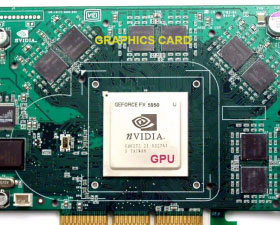
Graphics cards can be interchangeably referred to as video cards and GPUs. A GPU or Graphics Processing Unit, is the chip side of the Graphics Card and acts as the processor for rendering 3D images. The actual Graphics Card is the hardware itself which contains the GPU.
graphics cards help

Nvidia GeForceFX 5950 Ultra Graphics Card displaying the GPU

Two Types of Graphics Cards

1. Integrated Graphics

Integrated graphics are built into the motherboard of the CPU (Central Processing Unit). They don’t use their own RAM and therefore share the memory and resources of the processor. If the processor is busy executing other forms of data, the graphics side is greatly impacted which results in displaying poor graphics quality. Integrated graphics work efficiently with low-end graphics processing, producing less heat and consuming less power.

Intel Graphics Cards dominate the integrated graphics market and usually come packaged with many home computers and laptops.

2. Discrete/dedicated Graphics

These graphics greatly improve graphic quality and are far stronger in comparison to integrated graphics. Discrete graphics contain their own memory and CPU and are more demanding, faster and more powerful than their integrated counterparts. In contrast, they produce more heat and consume a lot of power. Discrete graphics are essential for 3D rendering and serious gaming. AMD and Nvidia are recommended when it comes to discrete GPUs for the best graphical experience.

continue to part 2 of this post >>

Filed Under: PC Fix Tips Tagged With: graphics

Graphics Cards – A Complete Guide, Part 2

By Saira Barlas on January 26, 2015

<< Back to part 1

Click here to Run a Free Graphics Drivers Scan, or update your Graphics Drivers >>

How to choose a Graphics Card

There are many factors to consider when selecting a Graphics Card to suit your needs. Graphics Cards are usually purchased for gaming purposes/graphics demanding programs, hence the following factors need to be considered when choosing one:

1. GPU

GPU is the number one factor when it comes to selecting a Graphics Card. Similar to the CPU, the GPU has many cores which the card uses to its maximum potential when processing images. The speed of the cores is measured in Clock Speed.

Clock Speed

This measures the speed of the cores in Gigahertz (GHz) or Megahertz (MHz). This is the speed at which cores process per second. Generally, the faster the Clock Speed, the higher the number of instructions executed.

2. RAM

This memory is needed to access and draw its images. You need to have sufficient memory in order for games, or any graphics demanding program, to process and display the images on screen. Bottlenecking is a problem that either stops or slows down the transfer of information. This is usually caused by insufficient RAM of the GPU. To bypass the problem, adequate RAM is necessary.

Bandwidth
This tells you how fast the card can access the card’s memory. The higher the Bandwidth, the faster the card will be able to fetch the data and graphics from the memory.

Bus Width
This processes the memory and controls the amount of data transferred. A lot of Bus Width is needed if a lot of memory is used to transfer data to and from RAM.

Clock Speed
This is the rate at how many times the RAM can be accessed each second. The faster the Clock Speed, the less time it will have to wait.

Specifications of a Gaming Laptop – Part 1

3. Shaders/Stream Processors/Cores

These terms all mean one thing and refers to the number of cores on a Graphics Card. They handle most of the tasks of rendering images and finalising them onto the screen. They carry out many rendering effects and have many types of Shaders. AMD refers to their Shaders as “Stream Processors” and Nvidia refers to them as “CUDA Cores”. Adding more cores ultimately increases the overall power of the GPU.

How do I check the Graphics Card in My Computer?

To see which Graphics Card you’re using, simply follow these steps:

1. Go to your desktop and right click, the following should appear on the screen

screen resolution graphics
change appearance display graphics

2. Click on “Screen Resolution” and a new window should appear on the desktop

3. Click on “Advanced Settings” which will prompt another window to open

graphics card properties

This should tell you the type of Graphics Card your computer is currently using.

Conclusion

1. GPU is the chip and it is situated on the hardware called the Graphics Card.
2. Integrated Graphics are suitable for everyday tasks whereas Discrete Graphics are necessary for high-end usage.
3. Selecting a Graphics Card which is required for high graphics performance involves considering a few major factors; GPU (Clock Speed), RAM (Bandwidth, Bus Width, Clock Speed), Shaders (AMD or Nvidia).

Filed Under: PC Fix Tips Tagged With: graphics

Specifications of a Gaming Laptop – Part 1

By Saira Barlas on January 22, 2015

A gaming laptop usually requires extra storage, better graphics and a faster CPU. It consumes more power and ican be quite bulky. To achieve the best gaming experience, the following factors should be taken into consideration when choosing the ideal gaming laptop:

1. GPU

What differentiates a gaming laptop from any other laptop is the GPU. The Graphics Processing Unit (GPU) is a single chip processor responsible for the high end graphics, videos and game performance. Also called discrete GPUs, these particular chips are solely committed to the graphics side of the laptop and have their own share of memory available, resulting in better performance.

There are many graphics chips to choose from, anything from Nvidia’s GeForce GTX series to AMD Radeon HD series is money well spent. It would still be wise to read up on the different Graphic Cards available and compare the prices and performance to suit your gaming needs, e.g. Nvidia’s cards are quieter and cooler yet AMD has some problems with older games-AMD is also more expensive which is reflected in the superior performance. Notebook Check provides an informative guide on examining the features of various Graphics Cards. A gaming laptop must have a Class 1 graphics card to be considered suitable for serious gaming.

Note that most gaming laptops come with single and dual GPUs yet when accounting for space and heat, a faster individual GPU is a much better option rather than dual.

2. CPU

CPU (the processor) is the second most important element after the GPU. It’s the core of the computer and is responsible for the operating system and applications that are run. The two top contenders in the CPU race are Intel and AMD, this is largely determined by factors such as:

clock speed – speed of a computer (in gigahertz)

number of cores – basic computation units of CPU (usually range from 2 to 6)

AMD processorintel core processor

AMD and Intel Processors

The higher the clock speed and cores, the greater the laptop speed. Intel’s quad Core i7 series is currently favoured  when it comes to gaming and stands up well against bottle-necking (the phase when a process slows/stops). Intel’s quad Core i5 series also compares well. Quad (four) cores are always preferred over dual (two) cores when it comes to the CPU.

It is important to note that if the games being played don’t demand the full use of the cores then the CPU will not be used to its maximum capacity. Hence it is always advisable to spend more money on the GPU side of the gaming laptop rather than the CPU.

3. RAM

Random Access Memory (RAM) is the primary memory in a laptop. DDR (Double Data Rate) is a type of RAM that transfers twice the data in a certain given time. From DDR2 to DDR3 to DDR4, the faster the memory, the more efficient the games will be. To prevent bottlenecking, a memory of 8GB or 16GB is required. More than sufficient allocated memory usually gives games and the Operating System adequate space to work with.

random access memory (ram)

Transcend DDR2 RAM 200-pin

Continue to “Specifications of a Gaming Laptop – Part 2” >>

Filed Under: PC Fix Tips Tagged With: gaming, laptop

  • « Previous Page
  • 1
  • 2
  • 3
  • Next Page »


  • Recent Posts
  • Popular Posts
        

Read More Posts


Read More Posts

Drivers.com Sites

  • Software Drivers
  • Drivers Ed

About Us

  • Advertise
  • About Drivers
  • Drivers Support
  • Drivers.com Privacy Policy
  • Disclaimer
  • Software Drivers
  • Mac Fixes and Tips
  • PC Fix Tips
  • Security/ Backup
  • Tablets & Smartphones
  • Tech News

© Copyright 2026 PDE Publications Ltd. End User License Agreement (EULA)