



Disabling or uninstalling Microsoft Edge in Windows 10 is easy and simple. Simply, follow the instructions shared in this post.
The steps for disabling Microsoft Edge are different than for uninstalling Microsoft Edge. We’ve shared steps for both tasks.
Steps to disable Microsoft Edge
You can disable Microsoft Edge quickly following these steps:
- Open Windows Explorer
- Navigate to C:\Windows\SystemApps
- Highlight Microsoft.MicrosoftEdge_8wekyb3d8bbwe folder
- Right-click Microsoft.MicrosoftEdge_8wekyb3d8bbwe folder and then click rename
- Now rename the folder as per your choice and click Continue
That’s just about it! The Edge browser is now disabled. If you want it back, simply rename the folder to its original name.
Steps to uninstall Microsoft Edge
Important: You may encounter stability issues if you remove Microsoft Edge. Instead of uninstalling it, you may want to consider changing your default internet browser. In case you still want to remove it, use the steps detailed below (at your own risk).
- Press Windows logo + S keys at the same time
- Type powershell and then click Windows PowerShell
- Type the following command in the pop-up window
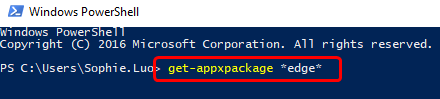
- Press Enter
- The detailed location of Microsoft Edge will appear
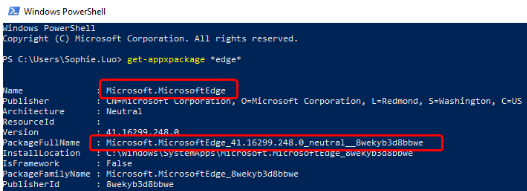
- Now type remove-appxpackage in the Powershell window. Press the space key and then copy the address next to the item PackageFullName and paste it after the command that you’ve just typed. Refer the screen shot below if you are not sure about what to do
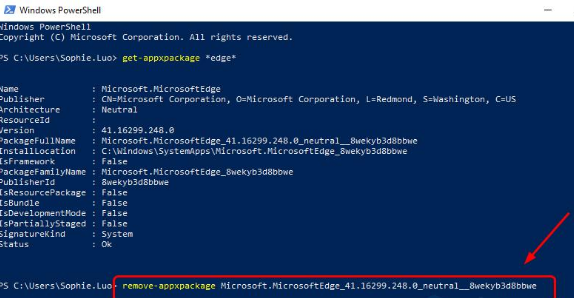
That’s just about it! The Edge browser should now be uninstalled.
If you are using the latest version of Windows 10, you may not get the desired result from this method. In that case, we recommend you disable Edge rather than delete it.
Leave a Reply