


Dell sound not working?
Audio problems with your Dell computer

Are you having sound problems on your Dell computer (such as bad sound quality or no sound at all)?
This article will show you how to update or fix your Dell Audio Driver.
Sound problems are often related to Audio Drivers but this is not always the case.
For this reason it is always a good idea to first look at hardware issues in order to at least rule them out.
Rule out the obvious Sound issues on your Dell device
It may seem very obvious but it can save you hours of needlessly troubleshooting a sound problem if you first check the points below!
- check that the speakers / audio output volume is not muted – check on both the device itself and the PC
- if the speakers are external, check the wires are plugged in fully and all necessary connections are made
If you are using external speakers, it is a good idea to check them via another device, if they work there then the problem is not with the speakers themselves.
When you have checked these issues and are confident that your speakers are not muted and the wiring is ok, then you can move on to the next troubleshooting step – checking sound drivers.
Check Sound card / audio adapter on Dell device
If you are not confident updating Drivers then you can use a Driver Update Tool such as Driver Updater to automate this process for you. Either way, before having to register the product, you can use the ‘Drivers scan’ option on Driver Updater to assess if your problem is driver-related. This may save you some time and the driver report is free.
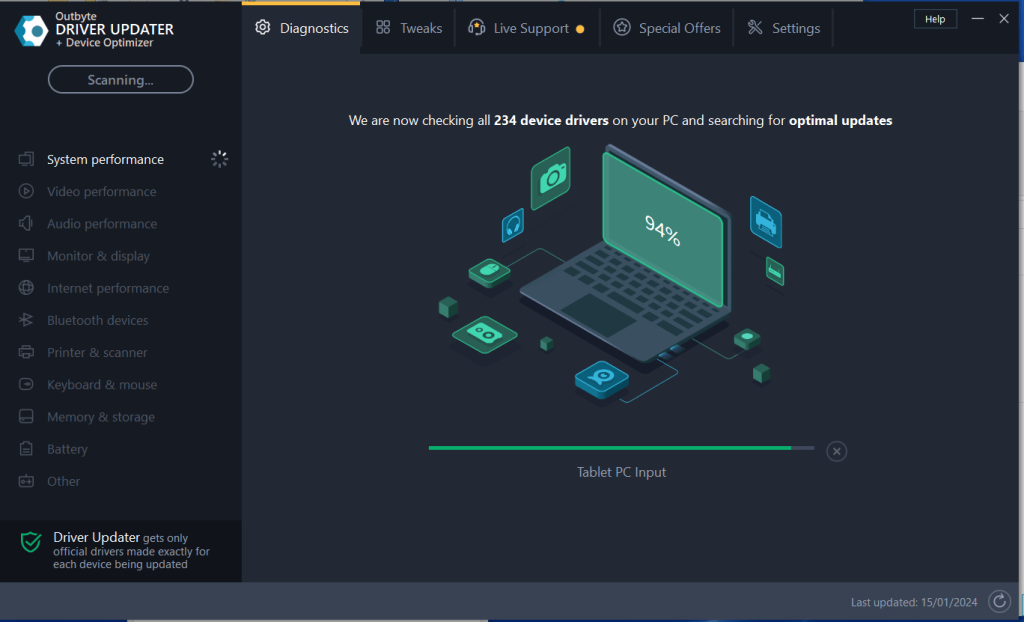
Follow the steps below to check if your sound card is working:
- select Start > (right click) My Computer > Manage
- In the Management window select > Device Manager
- Next to Sound, Video and Game Controllers click the + sign
- A yellow triangle will signify a problem so if one is present, right-click that device and select Properties
- You can then choose to update the driver
If you have not run Windows Updates in a while, you should do so now as this can often help resolve Drivers issues.
Manually update Dell Audio Driver
To manually update a Dell Audio Driver, perform the steps set out below:
1. Go to Start > Device Manager
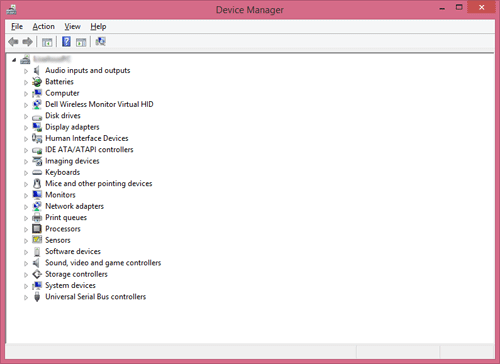
2. Select ‘Sound, Video and Game Controllers’
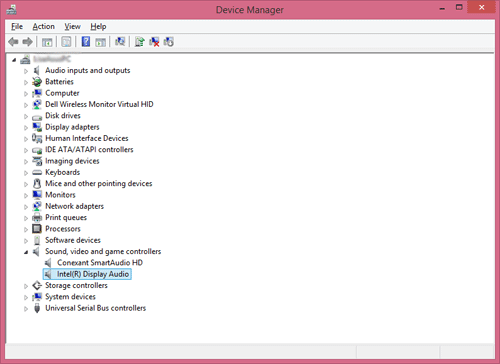
3. Right-click on the audio device from the list and select ‘Update Driver Software’
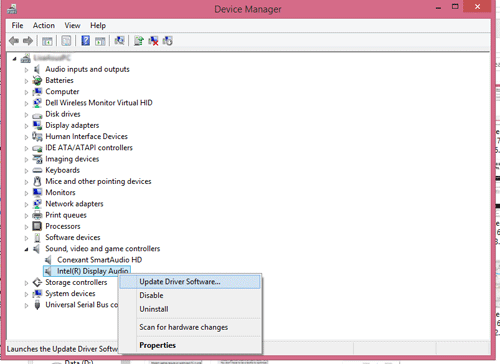
4. Click to select ‘Search automatically for updated driver software’
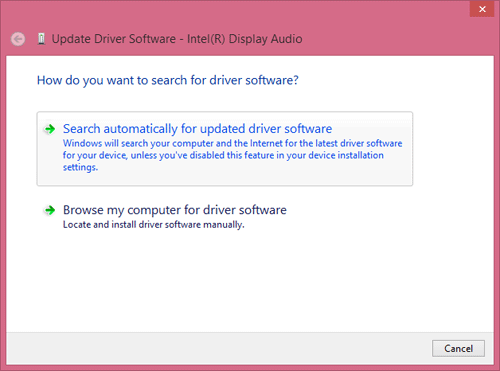
5. Your Dell Audio Driver should now be updated, you may need to restart your PC first.
If you are still having problems or would simply like to keep your Dell Audio Drivers, and all Drivers, updated, then you can choose the Automatic Driver Update option below.
Automatic Driver Updates for Dell Sound Drivers
A simple and effective way of fixing driver-related errors is by using a Driver Management Tool such as Driver Updater (download link below). Use our search tool or the links below to search for help/ articles on Dell audio/ sound driver problems.
huseyn says
super driver
tahir says
my problem in computer is audio driver and no install and update. plz tell me this problem plz give me information on my ID.
Abdul Ghaffar says
My computer is not installing sound driver please give me a solution about it how to fix the problem .?
vishnuvardanreddy n says
please verify the sound drives
tomas says
My dell sound sometimes disappears. I need to restar PC or do steps:playback select speakers, configure and press test . Maybe it notebook motherboard problem?
My laptop is new what I have to do?
peter says
my pc was formatted and the audio driver was not reinstalled again, so there is no sound now. pls send me help to my maail
G. Masha says
my pc does not have sound driver at all please send me to my above Email.
ginger says
my pc does not have any sound at all after a friend of mine installed windows 10 pliz send me info on what to do
Rafiq Baloch says
My laptop’s sound is not working and it’s not on mute, what do I do?
please help me. Thanks!
send me to my above Email.
Samuel says
Please can someone help me fix my audio problem. my laptop is Dell notebook window 7 latitude X1. My system displays NO AUDIO OUTPUT DEVICE IS INSTALLED. As a result of that,I can’t hear any sound again even when the video is playing.
mr.buqa says
driver sound problem
Thomas says
Running Windows 7 on a new Inspiron 17R. I have an external modem which I use to dial numbers. It dials o.k. but no sound of the dialing is coming from the computer’s speakers. Tried a number of different fixes and downloaded/installed the latest driver from the modem manufacturer. It has to be computer related and not modem related. Worked fine on the old Inspiron running on Windows Vista.
satya ranjan behera says
i have audio problem i.e. only background sound is coming with no words means the music behind the video is coming but what they talk ,their sound not coming.
drivers Help says
Is the sound distorted? Was it perviously working?
Charles says
bluescreen dump tells me there is a video driver problem
Problem signature:
Problem Event Name: BlueScreen
OS Version: 6.1.7601.2.1.0.256.48
Locale ID: 1033
Additional information about the problem:
BCCode: 116
BCP1: 84F7E008
BCP2: 8DC4E9B0
BCP3: 00000000
BCP4: 00000002
OS Version: 6_1_7601
Service Pack: 1_0
Product: 256_1
Dustin Klungtvedt says
Downloaded something to try to watch a NHL game online and sound stopped working. A pop up keeps showing up for new hardware found for “Audio Device On High Definition Audio Bus”. Please help, send to email please
bharath says
in my laptop i can listen sound through headset bt i cant hear any sound outside plzz help mee
Deus Lean says
Hello, I just want to ask what probably the problem of my laptop(its brand is Dell, Inspiron) built in speaker. Once I turned its volume to its max then I suddenly heard a growling noise or something distorted from my speaker, this problem continues until now.I checked the mixers but its all normal. Please need help.
sylvia says
Please I need help.my dell laptop doesn’t recognize any device and it says that it has been set to never install driver updates.how do I rectify it please?
Anik Islam says
my pc does not have any sound.Pc can’t found Hardware.my windows 8.How can i solve this problem?Pleace.tall me
jack says
audio on my 8 month old dell inspiron suddenly stopped.not a pc guru,need help.THANK YOU!
gvr883 says
Brand new Dell Inspiron 15. Sound is going out randomly. Dell said that it was a Microsoft problem and blamed it on them for not having a sound driver new enough. 2 month old computer and Dell won’t do anything. MS said Dell was full of *****.
I can’t believe how horrible the Dell customer service is.
Ahmad says
I have dell inspiron 15. my sound is not working properly. system is neither on mute nor driver update is req. I have to restart my computer and sometimes it does not work either. when i try to play media file sound goes off often. please help me solve this problem
Kim M Joy says
No audio output is installed
dell 17R inspiron
BINI JOHNSON says
My brand new Dell Inspiron 15 , its Sound is going out randomly.
i have to restart the laptop everytime for the sound to play. please help me
Md sohel says
how can i downlode & install dell pp21l sound driver?
AGATHIYA VK says
Hello, I just want to ask what probably the problem of my laptop(its brand is Dell, Inspiron) built in speaker. Once I turned its volume to its max then I suddenly heard a growling noise or something distorted from my speaker, this problem continues until now.I checked the mixers but its all normal. Please need help.
sayel says
i cant run any game plzz solve my problem is there any driver reqired to run game plzz send me linke to download that software/driver my model number is dell inspiron 15 3542 service tag:38XK412
VINOTHKUMAR says
i have got more information from this site,thanksss
Saikat Gupta says
I am havinf dell Inspiron 14R N4010. Error message no audio output device is installed
1) I had a hard disk replacement and installed windows 7 ultimate.
2) Installed windows 3 times still the problem has not gone.
driverHelp says
have you tried the free dell audio drivers scan (download driver update tool link)? The report will list the required drivers which you can then either search for online or download using the driver update tool
NasirBaghoor says
i want to need my all intell drivers updated autmatically in a week
sunil kumar says
My laptop sound is very slow rather then other laptop or it is very slow with respect to my mobiles sound so please help…….
Tanvir says
Boss, Sound driver i need for Dell model no:PP18L How can i get it
Drivers help says
tanvir – have you used the download link above to run the dell drivers scan?
victor says
i formatted my computer and changed the windows and there was no sound
Alan C says
I bought the Inspiron 14 7000 series laptop. When it arrived it had a static/wishy noise throught any headsets I used. The motherboard broke after a month. They sent it for repair which took a total of 6 weeks from breaking to re-delivery. They replaced the motherboard but said the sound was fine. When it came back, had the same sound issue. They just sent me the 15 7000 series as a replacement but it has the same sound issue. I think it must be a systemic problem with the series.For the price it is completely unacceptable.
Catherine A. Cortese says
no audio device is installed. can you please send me a solution.
femi b. says
i just formatted my dell precision m70 from windows XP to windows 7 and now my sound driver isn’t available and i have downloaded so many but its still not working
drivershelp says
Hi femi – have you tried using the download link in the article to run the free drivers scan? this will point you to the exact dell audio driver you should be using
anilkumar says
in my lapto inspiron 3542 am getting sound in right speakers and left speakers are not giving any sound plesase tell me what is the problem,and how to check the right and left speakers.
DriverAdvice says
have you checked the wiring to the speakers – do you mean external or internal speakers? If internal we can provide different troubleshooting so just let us know your system etc and if you have made any recent software changes
jimmy says
Check the BIOS and make sure audio is enabled. I had this same problem with a PC at the college I worked for and this turned out to be the solution.
kumar says
i had a dell 3542 lap which is 3 months old and suddenly sound had been stoped and the speaker are not working at all help me friends how to rectify the problem. THANK YOU
drivershelp says
Hi Kumar – did you do any updates? Have you double checked that the sound is not muted? Are speakers external or internal?
Drivers help says
where upgraded to Windows 7 and lost sound – have you tried the free drivers scan – use link in article – can then use the details to search for and download the relevant drivers
shariq farooq says
i formatted my windows and apply a new one windows 7 and i lost sound plz help me
shakir ahmad parrey says
hello every body i m shakir i m using a dell laptop in which i lost a sound by changing the windows plz help me and currently i m using windows 7
kmprg says
Hi,
on my inspiron 3521, when headphones are attached, I can’t adjust the volume thereof. The on-screen display appears when I use the fn/f11 or f12 combinations, I can move the sliding thingy in audio control, but nothing happens.
When the built-in speakers are in use everything works fine.
driverhelper says
can you try right-clicking on the sound icon in the system tray to see if headphones are showing and set as the default option? (headphones should be plugged in when doing this)
kmprg says
The headphones were showing.
I have now updated the driver, funnily enough, the headphones aren’t showing any longer, but what do you know, things are working perfectly and I can even adjust the headphone volume.
bernard says
my pc does not produce sound..says no sound device installed help please
dakota garey says
(1/2) my girlfriend has an dell inspiron 15, yesterday the audio stopped working to both the built in speakers and to the jack. Windows kept saying that the “sound card was not plugged in”. I troubleshot and found that the audio driver was working, i updated it and but to no avail. I ran “scf /scannow” from the command promt as an admin, this program is used to find corrupted data in the files windows deems protected (drivers, OS,and system files), not sure if this was part of the fix as the scan was still running as i did this next step.
in device manager i saw 2 audio drivers under the sound tab; The AMD HD Audio and Bluetooth Audio devices.under the other devices tab there was an “audio device on High definition audio bus” driver that didn’t have a driver. I let windows auto-install the drivers to it, which took almost 7 minutes. windows decided on a Realtek audio driver that fixed the problem, however the AMD driver still says its not plugged in.
dakota garey says
(2/2)
Potential solution
-run command prompt as an admin and use “sfc /runnow” and let it run.
-check command prompt->device manager->other devices for an audio driver. mine was titled “Audio Devices on High Definition Audio Bus”
– update drivers and let windows find the appropriate driver, it may take a while.
-if audio is working you can now disable the AMD audio driver
arunvairavan says
i had no sound after update to windows 8 mine lap model is inspiron1420 thus sound hardware working great i have test it and i nee gaming drivers
DriverAdvice says
sounds like you are missing the appropriate windows 8 sounds drivers – what does the drivers scan say?
latifa says
hi, i just updated my dell inspiration 15 laptop and the sound is not working after i updated it.
this is the 2nd time the first time was in august after i updated my laptop and i ended up by taking it to the shop ! and i bought a new one and now this is the same!!
what is the solution?!!
Ritika says
Whenever windows media player get started, firstly some sound comes from speakers and then song is played. And sometimes crackling sound also comes from the speakers.
DriverAdvice says
Hi Ritika – we have a blog post on this issue which may help you http://www.drivers.com/update/drivers-news/problems-sound-computer/
Fay says
I have dell Inspiron 15 , when I play a video or audio the speakers doesn’t work and If I plug in my headset it works , but I want sound from the build in speakers … Help plzzz
DriverAdvice says
Hi Fay – is anything showing in the Device manager? Have you tried a Drivers Scan?
sh says
My PC (DELL INSPIRON 1420) does not have any sound at all. I am not hearing anything. Could you kindly assist?
DriverAdvice says
Did you have sound before? Have you installed new software recently? Updating your Operating System?
Syed says
Hi. I have recently bought Inspiron 14, 3000 series , all of sudden every voice is gone. There is no voice at all. What should i do? i have not installed or deleted any software of anything. can you help please
ANKUR says
please go through the below link to resolve the internal speaker issue http://www.drivers.com/update/drivers-news/problems-sound-computer/
solbin says
my dell inspiron laptop is installing the sound device and there is no sound from it
khaled says
Hello
i have problem with mu computer it’s not have sound Driver.
i mean it’s not there sounds in my computer
so if u have any Seawater for it PLZ send to me as soon as possible
thanks
hana rubesova says
Hi, I have big problem my dell inspiron 2 in 1 series starting with 3 does not have sound at all after windows updates which downloaded automaticly on 19 May, even all sais its working propperly. Not only that happened as I cannot get to control panel change setting on updates, windows media player does not work at all, and when I have tried to restore to the point before that it was interrupted by the system and dell support system’s check up was also interrupted. Please help what can I do? It look like there is no way out. The notebook is 3 months oldaold everything was perfect until the updates…
Drivers help says
Hi Khaled – have you upgraded to a new OS recently or installed new software? Are you sure it is a Drivers issue? If so, run the drivers scan above – then search for the recommended drivers and download – you may be able to get them on the dell website once you find out the exact ones you need
drivershelp says
Hi hana – what does the drivers scan say?
Dan says
Try right clicking on the speaker icon at bottom right of screen.
Select playback devices … right click there and select TEST
If no sound and you show other playback devices .. try a different one
noahblount13 says
I did all of this on my widows 7 computer, but it still doesn’t play sound. When I try to click tes like the first comment said too, I get an error saying “Failed to play test tone.” Acoording to my computer my drivers are up to date and I really need help because this has been going on for two days now and I still have not found a solution. Thanks for any help at all.
DriverAdvice says
have you installed anything recently? Was the system always running windows 7 or did you upgrade?
Ryan says
I just downloaded Windows 10 on my Dell Inspiron n5100 and after sometime the sound isn’t coming at all. not even with headphones!plz help!
Ryan says
N5110 Sorry
venkateswara reddy says
My brand new Dell Inspiron 15 3521, its Sound is going out randomly.
i have to restart the laptop everytime for the sound to play. please help me
A helper says
Have you tried scanning for driver updates? Even new models may need to be updated by the time the machine is first used
Akshathaa says
Hi, the audio on my Dell Inspiron has suddenly stopped working since yesterday. Both with speakers and with headphone. The only recent downloads are Windows 10 upgrade. The sound worked fine for a few days after the upgrade also. Please help.
Drivershelp says
Hi akshathaa – are you sure you have not accidentally toggled a mute button? Are you seeing any specific error messages?
Ashish says
Hi,
I have updated my Dell laptop from Windows 8.1 to 10. Now, the sound is coming flat, no bass.
I did send this in twice in feedback to Microsoft.
It seems the wave maxx audio is not working or it has been disabled by Microsoft.
Could you please help.
anu says
Hi I have the same problem as Akshathaa. Recently upgraded to windows 10. sound was working fine for few days and all of sudden sound stopped working in both the headphones and speakers.
Can you please let me know if you have any idea or come accross the same problem.
thanks
Gobinda says
Hi,
I have updated my dell laptop from Windows 8.1 to 10. Now, the sound is coming flat, no bass.
How can fix it.
Please kindly suggest me.
Dan says
I had the same issue, no sound after the upgrade. I found the fix. I had to set Skype to not load with windows on boot up. Sound works great now.
Drivers help says
Thanks Dan – certainly worth trying. It can also often be problem with high definition drivers not being updated
Lourens says
Hi,
I have updated my Dell i5 inspiron 3521 laptop from Windows 8.1 to 10. Now, the sound is coming flat, no bass.
Akshathaa says
Hi. This is in regard to my previous comment.No i have not accidentally muted the laptop. Under device manager it says the speakers are working fine. But when i run the test audio sound for the speaker it says “cannot play test sound”. I cannot find anything else wrong.
Paul Isaac says
If the problem after windows 10 upgrade – go to Control Panel- Hardware and Sound- Dell Audio – Speaker/Head Phone- Speaker setup- select Headphone size -“Small”. I got my sound back
Jatin Chaudhari says
I have recently upgraded my OS from Windows 7 Ultimate to Windows 10.
Machine: Dell Inspiron 15 (N5010)
after upgrade it was fine but suddenly my audio output stopped somehow, tried everything disabling drivers, testing, updating.
then thought of uninstalling all the audio drivers and the re-installing. So downloaded latest IDT audio driver from dell site, uninstalled all audio drivers and then restarted computer, then installed newly downloaded driver, again restarted and bingo. Now works fine.
Worked for me (Dell Inspiron 15 (N5010))
mohamed says
Hi,
I have updated my Dell laptop from Windows 8.1 to 10. Now, the sound is coming flat, no bass.
It seems the wave maxx audio is not working or it has been disabled by Microsoft.
Could you please help.