


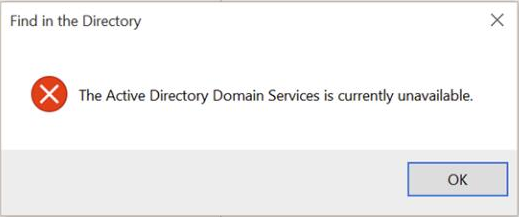
If your printer has suddenly stopped working and you are getting the “The Active Directory Domain Services is Currently Unavailable” error, you are not alone.
This is a common printer-related issue, and one that you can solve fairly easily.
In this post, we will discuss two easy methods to solve this problem once and for all. So let’s start.
Solution 1 – Tweak the Printer Spooler Settings
Here are the steps to follow:
- Press the Windows key + R key on your keyboard to launch the Run dialog box
- Type services.msc and then press the OK button
- In the right-pane of the Services window, right-click Printer Spooler and then click the Start button
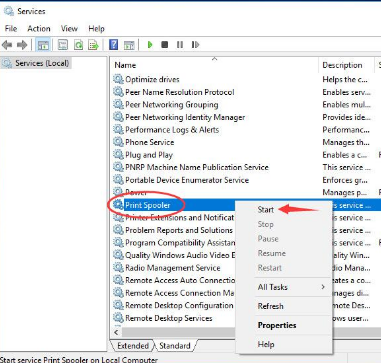
- Once the Printer Spooler service starts, double-click it. Next, using the drop-down menu under the General tab set its startup types as Automatic
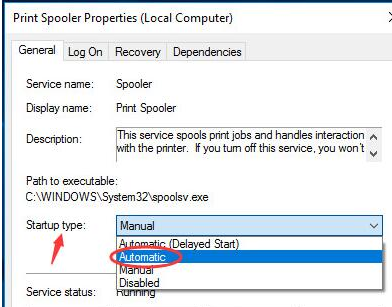
- Click the OK button
- Now check if the problem is fixed
Solution 2 – Use Registry Editor
If the problem persists, you will need to use registry editor. Here are the steps to follow:
- Press the Windows key + R key on your keyboard to launch the Run dialog box
- Type regedit and then press the OK button
- Click Yes if you see a User Account Control box
- In Windows Registry, navigate to this location

- Right-click Devices under CurrentVersion and then click Permissions
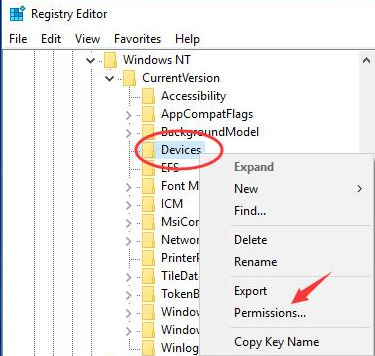
- Click your account. Next select Full Control
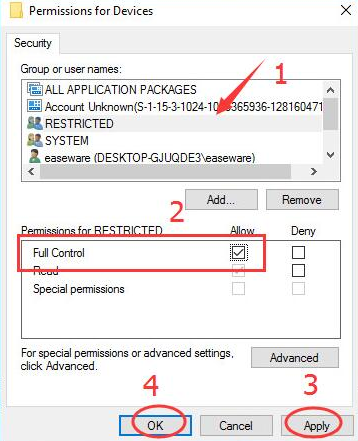
- Click the Apply button and then click OK
- Now give your account full control of PrinterPorts and Windows
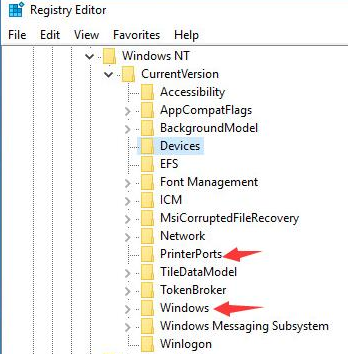
- Exit Windows Registry and check if the problem is fixed
We hope one of these two solutions would have worked for you. If you know any other solution for this problem, don’t forget to share it with us. Thanks!
Leave a Reply