
Drivers.com

follow us:

facebook twitter
  • Home
  • Download Drivers
  • Drivers Help
  • PC/Mac Resources
  • Software Drivers
  • Mac Fixes and Tips
  • PC Fix Tips
  • Security/ Backup
  • Tablets & Smartphones
  • Tech News
  • Software Drivers
  • Mac Fixes and Tips
  • PC Fix Tips
  • Security/ Backup
  • Tablets & Smartphones
  • Tech News

Resources by Tag

YouTube downloader

Getting your default Google Chrome Homepage Back

Getting your default Google Chrome Homepage Back

Users often complain their Chrome’s homepage changes after they download a YouTube downloader or some other software. While irritating, the problem can be easily fixed.

To fix the problem you would need to perform the following steps:

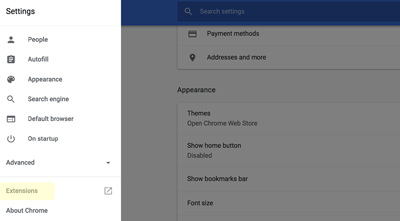
chrome settings home
  1. Open Google Chrome
  2. Click Customize and control Google Chrome button located at the far top-right corner (right after the URL box)
  3. Click Settings
  4. Click Extensions on the left-hand side
  5. Clear the check box of the installed downloader
  6. Close Google Chrome and re-launch it

The next time you restart Google Chrome you will see your old homepage again.

Most downloader programs and other freeware programs are harmless from a security point of view. Nevertheless, it is recommended that you use a robust antivirus software program and scan any downloaded program before installing it.

Slow Chrome Fixes (6 DIY Solutions)

Filed Under: PC Fix Tips Tagged With: anti-virus software, downloader programs, Google Chrome, YouTube downloader


  • Recent Posts
  • Popular Posts
        

Read More Posts


Read More Posts

Drivers.com Sites

  • Software Drivers
  • Drivers Ed

About Us

  • Advertise
  • About Drivers
  • Drivers Support
  • Drivers.com Privacy Policy
  • Disclaimer
  • Software Drivers
  • Mac Fixes and Tips
  • PC Fix Tips
  • Security/ Backup
  • Tablets & Smartphones
  • Tech News

© Copyright 2026 PDE Publications Ltd. End User License Agreement (EULA)