


The universal serial bus controller is an important element of Windows OS. It refers to the driver programming interface that interacts with USB connectors, host controllers, and USB devices. If you face any Universal serial bus controller issue, your system might not recognize USB devices like keyboards, mice, pen drives, etc. Here we have discussed a few solutions that could help you fix Universal serial bus controller issues.
Solution One – Uninstall Universal serial bus controller driver
Any problem with the Universal serial bus (USB) controller driver can be easily identified and found in the Driver Manager. Generally, you will see the Universal serial bus controller (USB controller) listed under other devices with a yellow exclamation mark that signifies the USB controller does not have the right driver. An easy solution to this problem is uninstalling the Universal serial bus controller driver. Here are the steps to follow to uninstall the USB Driver.
- Press key combination Windows Key + R to invoke the Run command
- In the Run command box, type devmgmt.msc and hit Enter
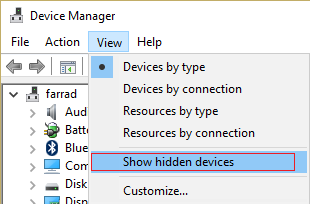
- In the Device Manager window, click View in the menu bar
- Click Show hidden devices
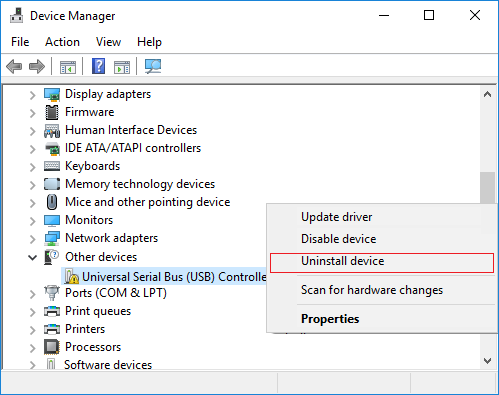
- Go to Other Devices and expand it
- Right-click Universal serial bus controller and select Uninstall Device
- Close Device Manager
- Restart your computer
Windows will install the right drivers from its driver stack that will resolve the Universal serial bus controller driver issue.
Solution Two- Uninstall Device Driver
This solution might look the same for many users but it isn’t. Here the problematic Universal serial bus controller driver is listed under Universal serial bus controllers. The right solution for you depends on the location of the Universal serial bus controller with a yellow exclamation mark. Here are the steps to follow.
- Open Device Manager
- Go to the Universal serial bus controllers section and expand it
<insert-usbc-Universal-Serial-Bus-controllers section>
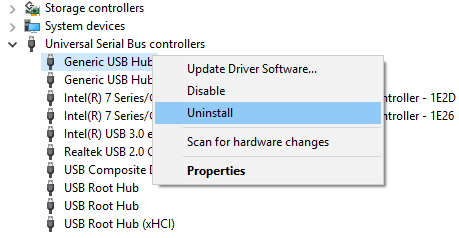
- Look for Universal serial bus controllers entries in the list with a yellow exclamation mark
- Right-click Generic USB hub and click Uninstall
- If asked for confirmation, click Yes or Confirm
- Follow this for all Universal serial bus controllers
- Close all windows
- Restart your PC
If the Universal serial bus controllers issue is not fixed by following steps in Solution 2, proceed to the next solution in the list.
Solution 3- Update Device Drivers
If you look closely at the Universal serial bus controllers section in the Device Manager, you will find Generic USB hub entries. According to Windows experts, the generic hub splits one USB port into multiple ports available on your computer. The problem related to the Universal serial bus controllers might be linked to an outdated generic USB hub driver.
Here we will try updating the generic hub driver and see if it helps. You can update the driver manually or automatically. Though we recommend the latter, as it’s faster, simpler, and more reliable, we have shared the steps for both.
Update the driver manually
Here are the steps to follow.
- Open Device Manager
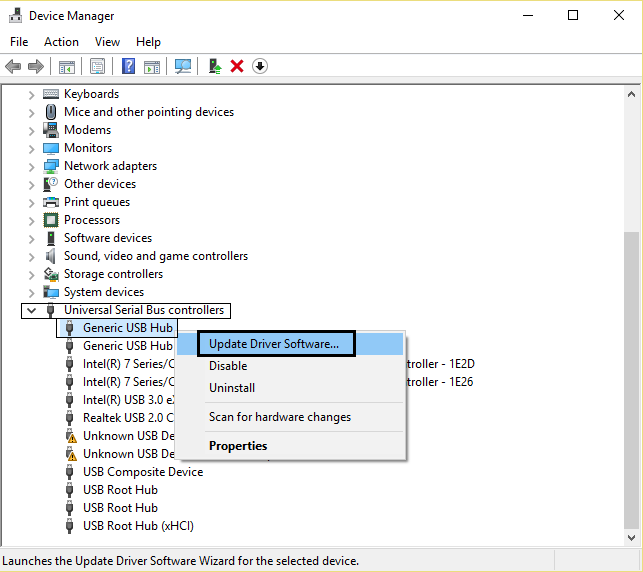
- Expand the Universal serial bus controllers section
- Right-click the Generic USB hub entry and select Update Driver Software
- Select Browse my computer for driver software.
- In the next window, click Let me pick from a list of drivers on my computer.
- Now, select Generic USB Hub from the list of drivers
- Click Next
- Wait for Windows to complete the installation
- Click Close
- Repeat the above steps for all Generic USB hub entries under Universal serial bus controllers
- Close Device Manager
In most cases, your Universal serial bus controllers issue would be resolved. If you still see the issue persists, update system drivers.
Update the Driver automatically
Automatic driver update tools offer many benefits, the most important ones being:
- You can update device drivers automatically
- The software scans and updates all outdated or missing drivers at one go
- The tool picks the right drivers for your device and operating system, so you won’t have to worry about installing an incorrect driver by mistake
- Automatic driver updates are 100% safe
Driver Updater is one of the best driver update tools out there. Outbyte Driver Updater will give you access to a database of over 1 million drivers. It will regularly scan your PC, suggesting new driver versions to install. Driver Updater contains drivers for a variety of Windows devices. With just one click, you can update drivers in your system.
Step 1
Click here to Install and launch the app
Step 2
Scan all devices
Step 3
Install or update drivers automatically