
Drivers.com

follow us:

facebook twitter
  • Home
  • Download Drivers
  • Drivers Help
  • PC/Mac Resources
  • Software Drivers
  • Mac Fixes and Tips
  • PC Fix Tips
  • Security/ Backup
  • Tablets & Smartphones
  • Tech News
  • Software Drivers
  • Mac Fixes and Tips
  • PC Fix Tips
  • Security/ Backup
  • Tablets & Smartphones
  • Tech News

Resources by Tag

pixma

Canon PIXMA MG2522 Driver Download & Update

Canon PIXMA MG2522 Driver Download & Update

Are you having problems with your Canon PIXMA MG2522 printer not printing? Is your printer behaving erratically or crashing when you are trying to send print jobs?

If so you may have a problem with corrupt or out-of-date Canon printer drivers. In this post we will show you two of the main methods for updating your Canon PIXMA MG2522 printer drivers. Updating your printer drivers should fix any print errors and issues preventing you from using your Canon printer.

1. Automatically update Canon printer drivers

This is the fastest option as the update process is automated and all you need to do is download the driver update tool. This will also ensure all your other drivers (sound, USB, wifi etc) are kept up-to-date.

2. Manually update Canon printer drivers

This option may take a bit longer than the first one but if you are confident in downloading and installing files then you could try this option. You will need to be familiar with both your printer model number and your Operating System.

1. Automatically update Canon printer drivers

If you want the quickest and simplest option for getting your Canon PIXMA MG2522 printer back in action, then you can download a driver update tool to automate this process for you.

driver updater

Automatic driver update tools offer many benefits, the most important ones being:

  • You can update device drivers automatically
  • The software scans and updates all outdated or missing drivers at one go
  • The tool picks the right drivers for your device and operating system, so you won’t have to worry about installing an incorrect driver by mistake
  • Automatic driver updates are 100% safe

Driver Updater is one of the best driver update tools out there. Outbyte Driver Updater will give you access to a database of over 1 million drivers. It will regularly scan your PC, suggesting new driver versions to install. Driver Updater contains drivers for a variety of Windows devices. With just one click, you can update drivers in your system.

Step 1
Click here to Install and launch the app

Step 2
Scan all devices

Step 3
Install or update drivers automatically


Start Download


2. Manually update Canon PIXMA MG2522 printer drivers

If you choose to manually update your Canon 2522 printer drivers, you will first need to go to the Canon website support section.

Then select ‘software & drivers’ > ‘printers’ > PIXMA > MG Series > PIXMA MG2522

You may also see the screen where you simply type in the printer model directly as below:
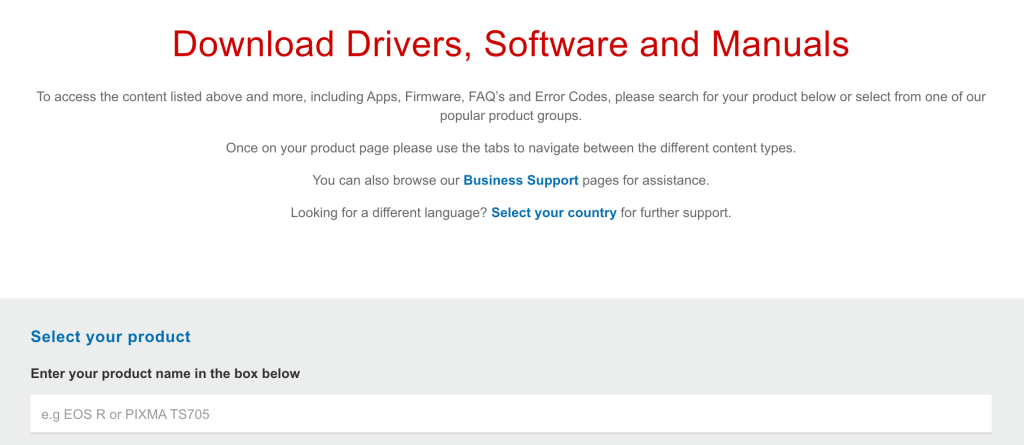
download canon pixma mg2522 printer drivers

You will then need to select your operating system from the dropdown list and finally click ‘select’ next to the driver file you wish to download. Select ‘download’ to download the file.

Restart your computer after downloading the driver file.

You should now have updated drivers for your Canon MG2522 printer. If you are still having problems with your printer, see some of our printer troubleshooting posts below.

Canon Pixma – common errors and fixes
Fix Canon Printer Error

Filed Under: Software Drivers Tagged With: 2522, canon, pixma, printer

Canon Pixma – common errors and fixes

The Canon Pixma is one of the biggest series of printer and multi-function devices. The printer supports a variety of connections which includes USB and wireless connection. In the following article we set out the two most common errors related to the Canon Pixma.

Error fix for “Cannot install printer: not recognized”

This error usually occurs when you try to run Canon Pixma setup using the CD provided with the printer. Despite having the right setup file, the computer fails to recognize the printer connected through the USB connection.

Fix Canon Printer Error

The most common cause of this error is an incompatible Driver. You need to download and install the latest Printer Driver for the model. If your computer has a USB 2.0 and USB 3.0 port, try connecting the printer to USB 2.0.

Some Canon Pixma Printers do not work with Windows 8 until you download and install the appropriate Driver for the printer. To do so, complete the following steps:

  1. Go to the official website of Canon
  2. Go to Service and Support Center
  3. Enter the model name in the Search box
  4. Click on Drivers and Software
  5. Download the Drivers for your Canon Pixma Printer
  6. Once the file is downloaded, click it and follow the on-screen instructions to install the Driver
  7. Reboot computer and your Printer

Fix wireless connection problems with Canon Pixma

Sometimes the Canon Pixma Printer may fail to establish a wireless connection with the router. To resolve the issue, follow the steps given below:

  1. Select Setup on the Home screen
  2. Select Device settings and Press OK
  3. Select LAN settings and Press OK
  4. Confirm LAN settings and Press OK
  5. Select Print LAN details and Press OK
  6. Select Yes Print LAN details and then Press OK to start printing
  7. Look at the Signal Level. Recommended values are 70% or higher
  8. Look at Link quality level. The higher the quality, the stronger the connection. If the Link quality level is showing a lower value, try moving the printer closer to your router.

In most cases, the dropping of a wireless connection will be solved by following the steps given above.

Update Canon Printer Drivers

Some of the connection errors can also be caused by incompatible Drivers. You need to ensure you keep the Printer Driver updated at all times to prevent any issues. Manually downloading Printer Drivers can be time-consuming and in cases like this, using Driver Update Software can be very helpful.

To update your Canon Pixma Driver automatically, you can download a driver update tool

Filed Under: Software Drivers Tagged With: canon, pixma, printer


  • Recent Posts
  • Popular Posts
        

Read More Posts


Read More Posts

Drivers.com Sites

  • Software Drivers
  • Drivers Ed

About Us

  • Advertise
  • About Drivers
  • Drivers Support
  • Drivers.com Privacy Policy
  • Disclaimer
  • Software Drivers
  • Mac Fixes and Tips
  • PC Fix Tips
  • Security/ Backup
  • Tablets & Smartphones
  • Tech News

© Copyright 2026 PDE Publications Ltd. End User License Agreement (EULA)