
Drivers.com

follow us:

facebook twitter
  • Home
  • Download Drivers
  • Drivers Help
  • PC/Mac Resources
  • Software Drivers
  • Mac Fixes and Tips
  • PC Fix Tips
  • Security/ Backup
  • Tablets & Smartphones
  • Tech News
  • Software Drivers
  • Mac Fixes and Tips
  • PC Fix Tips
  • Security/ Backup
  • Tablets & Smartphones
  • Tech News

Resources by Tag

microsoft

Change outgoing server port in Outlook

If you are having problems with sending mails in outlook, the issue may be relating to the outgoing port you are using.

This will apply if you are required to use a specific port for outgoing mail (check with your host).

To enter a specific outgoing mail port number do the following:

  • open Outlook
  • click on settings (or the gear icon in the row of icons on the bottom left of your Outlook screen
  • this will open your settings option menu > select ‘manage accounts’
  • click on the account you wish to edit the port settings for
  • click on the ‘options for syncing your content’ link
  • scroll down to ‘incoming and outgoing mail server info’ and click on this link
  • in the out going mail server, enter a colon (:) after the server name and then type the server number (don’t use any spaces)
  • save and exit settings

Try sending a test email. This will work the same if you need to change the incoming server port.
Filed Under: PC Fix Tips Tagged With: email, mail, microsoft, Outlook, Windows, windows10

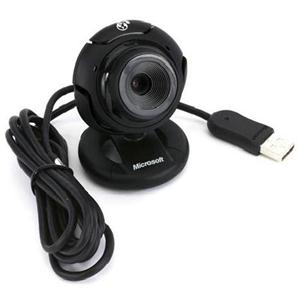
LifeCam Driver: LIFECAM VX-1000 Driver Errors

lifecam driver fixLifeCam Driver Error & Solution:

Resolving web camera errors can be tricky as often a computer may not show any error message and all you see is a blank screen. To help you out, here are some common LIFECAM VX-1000 errors and their solutions.

Solution to errors displayed by LifeCam Software

When there is a problem with LifeCam VX-1000, either of the following occurs:

  • You get a blank screen when you launch LifeCam software
  • You see a random error message, such as “There is no camera connected to the computer” or “Initialization error”

There are several reasons for such errors: corrupt Display Drivers, LifeCam software not installed properly, or the computer does not meet the minimum system requirements for installing LifeCam VX-1000.

The first thing you must do is ensure your system meets the minimum requirements for LifeCam VX-1000. If it does not, perform the necessary upgrades.

LifeCam VX-1000 requires a USB connection

You should always connect LifeCam VX-1000 to USB ports that are directly connected to the motherboard as they offer better bandwidth than front USB ports. After connecting the LifeCam VX-1000 to a direct USB port, download and install the latest LifeCam software available for your webcam. If the problem still persists, you need to check Video Adapter Drivers and adjust display settings on your computer to resolve the issue.

Steps to update Video Adapter Drivers

To update Video Adapter Drivers, you need to have the name of the device and manufacturer of your video hardware. Follow the steps given below to find the necessary information about the video adapter manufacturer:

  1. Click Start
  2. In Start search box, type dxdiag. Press enter
  3. If prompted, enter Administrator password.
  4. Click Display Tab.
  5. Under Device tab, you can get the details of name and manufacturer of your video hardware.
  6. Click Exit

You will be required to use this information to download latest Drivers for video hardware from the manufacturer’s website.

Steps to adjust display settings

The minimum display resolution required for LifeCam VX-1000 is 800 x 600 at High Color.  Follow the steps given below to adjust display settings

  1. Click Start
  2. In Start search box, type Personalization
  3. In the Programs List, click Personalization
  4. In Display Properties, click Settings Tab
  5. Move the Screen Resolution slider to 800 x 600 pixels setting
  6. In the Color Quality box, click on Highest
  7. Click OK two times
  8. Click Yes to save the changes to Display Settings

In majority of the LifeCam VX-1000 Driver errors, you will be required to download and install the latest Drivers for your Display Adapter and Webcam. This task becomes much easier with a Driver Update Tool, which automatically scans and updates all outdated Drivers on your system in minutes.

To update your LifeCam VX-1000 Drivers automatically, you can use a driver update tool and run a free Driver scan for your LifeCam VX-1000 or you can choose to manually update the drivers yourself.

Filed Under: Software Drivers Tagged With: camera, lifecam, microsoft

Microsoft to introduce 7-inch Windows 8 tablet

Can’t get enough of Windows 8 Surface tablet and want it a new, smaller option? Then there is some good news for you. By the end of this year, you may be able to get hold of something along these lines.

Microsoft, finally, has jumped on the smaller tablet bandwagon and is working on a new range of 7-inches Surface (Windows 8) tablet. Not part of its original plans, the idea of developing smaller tablets struck Microsoft only after other smaller tablets, especially Nexus 7 (made by Google) and iPad mini, became a success. The encouraging response that Surface Pro and Surface RT got following their launch last October was also responsible for shaping Microsoft’s new decision.

With more and more people favoring smaller tablets over 13- and 15-inches tablets, Microsoft is hopeful of success in this segment of the market.

While Windows 8 is faster and better than Windows 7, many users have decided to stick with their older Windows version. Windows 8 has done away with quite a few features present in Windows 7, and probably for this reasons many are reluctant to make the switch. The version of Windows one uses is a personal choice. What is more important that you keep it protected from virus and other malware attacks. This is something you can achieve easily by using a reliable antivirus tool.

Filed Under: PC Fix Tips Tagged With: microsoft, tablet

Microsoft Surface fails to make the expected impact

Microsoft Surface Pro and Surface RT, according to the latest reports, have failed to make any major impact. While, before the launch, many experts had projected over 2 million sales in the first quarter, only 1.5 million devices have been sold so far.

Microsoft’s own expectations were huge — sales of 3 million units in the first 3 months. It is clear now that Surface Pro and Surface RT have failed to live up to the hype preceding their launch.

Microsoft, quite expectedly, has downplayed the tepid welcome that its new iteration received. However, it is clear that unless the sales pick up drastically, Microsoft is not likely to achieve its target of selling a few million units of Surface Pro and Surface RT in the first 12 months.

Regardless of the lack of enthusiasm over Microsoft Surface Pro and Surface RT, there is no denying that Windows 8 is much faster and safer Operating System than Windows 7. But this does not mean you don’t need an antivirus tool for Windows 8. Like all Windows versions before it, Windows 8 can function in a safe manner only if it is loaded with necessary security tools like a reliable antivirus tool.

Filed Under: PC Fix Tips Tagged With: microsoft, Surface


  • Recent Posts
  • Popular Posts
        

Read More Posts


Read More Posts

Drivers.com Sites

  • Software Drivers
  • Drivers Ed

About Us

  • Advertise
  • About Drivers
  • Drivers Support
  • Drivers.com Privacy Policy
  • Disclaimer
  • Software Drivers
  • Mac Fixes and Tips
  • PC Fix Tips
  • Security/ Backup
  • Tablets & Smartphones
  • Tech News

© Copyright 2026 PDE Publications Ltd. End User License Agreement (EULA)