


![d3dx9_43.dll missing error [6 DIY Solutions]](https://www.drivers.com/wp-content/uploads/2021/10/DISM.jpg)
If you are using your Windows computer for playing games, you might come across the d3dx9_43.dll missing error. The error usually appears when are trying to launch a game. You will not be able to run the game until the error is resolved. You may also receive the d3dx9_43.dll missing error with other applications, but it is mostly encountered when launching a game.
The error will only prevent you from running an app or game not from reinstalling the app or game. Let’s take a look at this error in detail.
What is d3dx9_43.dll missing error?
As the name suggests, the error informs you about a missing dll file. DLL stands for dynamic linked libraries. A DLL file is a library of code and data that can be used by one or more programs.
In Windows, much of the functionality of programs is provided by shared DLL files. The use of DLL files promotes code reuse, modularization of code, reduced disk space, and memory usage. When a program uses DLL, it depends on the DLL file on execution and may not run if the DLL is missing.
The d3dx9_43.dll is one of the files in the DirectX software collection. Advanced graphics program and Windows based games rely on DirectX for their smooth functioning..
Solution One – Install DirectX
Since the missing file is part of DirectX software collection, you need to install latest version of DirectX on your PC. Microsoft provides updates to DirectX but the version number remains same. Here are steps to install DirectX on your computer.
- Click this link to download latest DirectX
- Download the DirectX offline installer.
- Run the offline installer. It will install all DirectX components on your computer including d3dx9_43. Dll. This is a preferred option if the d3dx9_43. Dll is corrupted.
You can also use web installed to install DirectX. However, it will not replace any corrupt files. Hence, experts suggest users to opt for offline DirectX installer.
Solution Two- Install updates
Since Windows 8, Microsoft provides DirectX updates through Windows updates. Windows 8 uses DirectX 11.1 while Windows 10 uses DirectX 12. To get latest DirectX for your computer, you need to install all pending updates. Here are the steps to follow.
- Click Start->Settings(cog wheel)
- In the Settings window, click Update & Security
- Click check for updates button
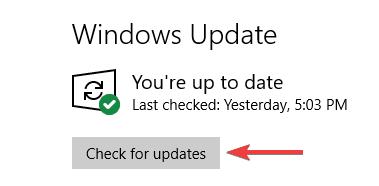
Windows will check for updates and install them.
Solution Three – Reinstall problematic program
Most games and programs are bundled with DirectX version. It means everything needed to run the game/program is included in the setup file. If you are facing d3dx9_43. dll file missing error with specific program or game, then uninstall and reinstall the game. Reinstalling the game/program will ensure all software components needed by game/program are newly copied/installed in your system.
Solution Four – Run SFC and DISM scan
SFC (System file checker) is an in-built windows maintenance tool that checks the integrity of system files and replaces any missing or corrupt system files. Since d3dx9_43. Dll file is integrated in new Windows builds (8 and 10), running an SFC scan can help resolve the issue. Here are the steps to follow.
- Click Start and type cmd in the search box
- From the results, right-click Command Prompt and select Run as administrator
- Click Yes in the User Account Control Menu prompt
- When you see a blinking cursor appears in the command window, type sfc/scannow

- Hit Enter on the keyboard
Wait for the SFC scan to complete.
Launch the problematic game or program and see if the issue is resolved. If you still get d3dx9_43. dll file missing error, run DISM scan. Here are the steps to follow
- Open command prompt with administrator privileges
- When you see a blinking cursor appears in the command window, type DISM /Online /Cleanup-Image /RestoreHealth
- DISM scan will now start. Wait for the process to complete
Solution Five – Copy d3dx9_43. dll file from another computer
You can copy d3dx9_43. dll file from another computer. However, the version and architecture of other computer needs to be same. For example, if you have a Windows 10 64-bit operating system running on your PC. The other Windows PC (source of DLL file) should be running Windows 10 64-bit operating system. The same rule applies to 32-bit Windows operating system. Here are steps you need to follow on another computer
- Press the Windows key + E together to open Windows Explorer
- Go to C:\Windows\System32
- copy d3dx9_43. dll and save it on your flash drive
Here are the steps you need to perform on your computer
- Attach the flash drive to your computer
- Open Windows Explorer on your computer and go to C:\Windows\System32
- Copy the d3dx9_43. dll file from USB to C:\Windows\System32
Solution Six – Update Graphics Drivers
Since d3dx9_43. dll file is related to graphics, you can manually update display drivers on your Windows PC. Here are the steps to follow
- Go to your video manufacturer website
- Enter the product serial number and go to the Downloads section
- Look for latest version of display driver for your graphics card
- Download latest graphics driver
- Double click the installation file and follow onscreen instructions. You may have to reboot windows once the installation is complete
Alternatively, you can use a Driver Update Tool to updated drivers automatically.
Outdated drivers can cause serious problems with your PC. With Driver Updater keeping your drivers up to date is very easy. With just a few clicks, you can update all your drivers. A free trial of this Driver Update Tool means you can give it a try without commitment.
Automatic driver update tools offer many benefits, the most important ones being:
- You can update device drivers automatically
- The software scans and updates all outdated or missing drivers at one go
- The tool picks the right drivers for your device and operating system, so you won’t have to worry about installing an incorrect driver by mistake
- Automatic driver updates are 100% safe
Driver Updater is one of the best driver update tools out there. Outbyte Driver Updater will give you access to a database of over 1 million drivers. It will regularly scan your PC, suggesting new driver versions to install. Driver Updater contains drivers for a variety of Windows devices. With just one click, you can update drivers in your system.
Step 1
Click here to Install and launch the app
Step 2
Scan all devices
Step 3
Install or update drivers automatically
Leave a Reply