


Want to update Dell drivers for windows 7?
If you need to update your Windows 7 Dell Drivers, ensure you only download official Dell drivers. Otherwise, you run the risk of getting your Windows computer becoming infected with malware, spyware, or viruses. Many websites contain harmful programs disguised as genuine files, so only download Dell drivers from Dell’s official website or reputable Driver Update Tool.
Continue reading to find out how to download Dell drivers for Windows 7.
Downloading Dell Drivers for Windows 7
You can download Dell drivers — or, for that matter, any device drivers — either manually or automatically. The manual process is not only time-consuming but also requires a bit of technical knowledge. If you want an easier method, use a reliable driver update tool.
In this post, we have shared both the methods. You can pick the one that works best for you.
Downloading Dell Windows 7 Drivers Manually
Here are the steps to follow:
- Open Chrome or any other internet browser
- Navigate to Dell driver download page
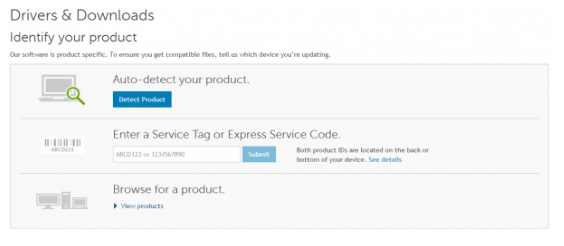
- Next, identify your Dell product. You can do so in three ways. Here we will be using the “Browse for a product” option for “Dell Vostro 3900”. However, if you don’t have the model name of the product with you, it’s better to click the Detect Product option. This allows you to download and install Dell System Detect, which will automatically detect your product
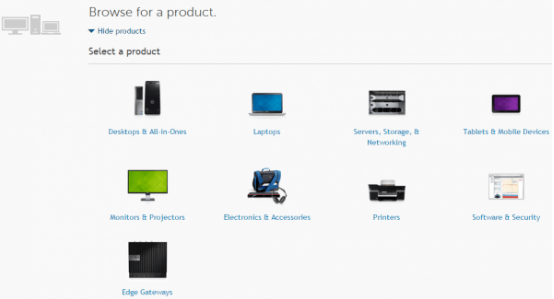
- View products and then choose the right product. In our case, we chose Desktops & All-in-ones
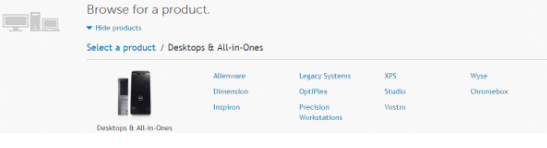
- Now, choose the right series. We have selected Vostro for Dell Vostro 3900
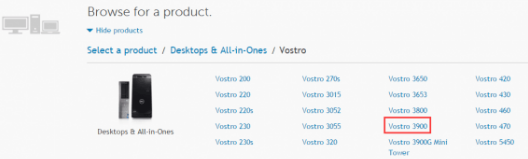
- Choose the specific product
- Now you will be taken to the download page. Here, click Find it myself. Next, select your OS (
If you are running Windows 32-bit, then change the OS to 32-bit. Likewise those who use 64-bit Windows must select 64-bit)

- Now you will see a list of available drivers. Download the correct driver
Download Dell Windows 7 Drivers Automatically
If you don’t want to go through all the hassle the manual method entails, we recommend you use a Driver Update Tool. With it installed, you can download the latest drivers for your Dell and other devices.
Outdated drivers can cause serious problems with your PC. With Driver Updater keeping your drivers up to date is very easy. With just a few clicks, you can update all your drivers. A free trial of this Driver Update Tool means you can give it a try without commitment.
Download using the link below and get your Driver problems fixed.