


How to fix PCI Modem problems
The first thing to do when you are having a problem with any device, is to go to the Device Manager.
Update for PCI Modem problems in Windows 10
In windows 10 go to the Device manager and look for any issues highlighted beside the relevant device name.
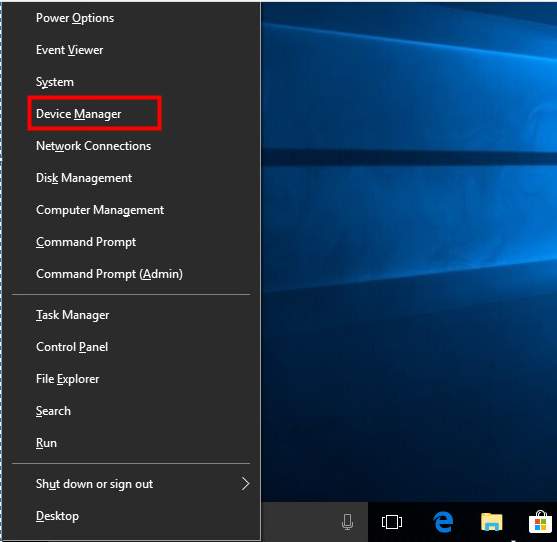
If you are using Windows Vista, use the following steps to access the Device Manager:
- right-click on My Computer
- select Properties
- select Device Manager
If you are using Windows XP, use the following steps to access the Device Manager:
- right-click on My Computer
- select Hardware
- select Device Manager
Once in the Device Manager, any devices experiencing problems will be flagged with a yellow triangle.
Common symptoms of PCI Modem problems
Bad or erratic connection to the internet, dropped connections and slow connection speed are all common symptoms of PCI Modem problems. You may also have no dial tone when trying to connect your PCI Modem, but this is not always the case.
Common causes of PCI Modem problems
Problems can occur with PCI Modems for a number of reasons, run through the main causes below to rule out problems one by one.
- If you can, switch to a different PCI slot to rule this out as the cause of the problem.
- Check with your ISP to make sure there is no problem with your actual connection
- You should run a free Drivers scan to check for outdated or missing drivers.
Updating PCI Drivers:
You can use the Microsoft Update Tool in XP to check if there are updates for your drivers. If your drivers are out of date you will need to get details of the PCI Modem driver in question and then contact the manufacturer for an update. Some manufacturers are better than others in responding to these requests.
Alternatively, you can let a driver update software do the work for you but there is usually a registration fee involved. For this option, view details on our driver update tool here.
Automatic Driver Updates
For many this is a more simple and effective way of fixing driver-related errors.
By using a good driver update tool you can instantly resolve your drivers problems by scanning your PC for outdated, missing or corrupt drivers, which are then automatically updated to the most compatible version.
Shubham Sharma says
i want intex boss 5.2 modem driver.plz send me to email.
nga says
I want to download drivers
Nikhil Kishore says
i have beetel modem model MF 190 it is not working with window 8.1, help me to fix this issue.
nueng says
Can’t find by ID [pciven_8086&dev_1c3a&subsys_844d1043]
please help me
amissah says
please i want to know how i can install my pci simple communication controller, and Ethernet Controller. i have tried several occations to download the drivers but when ever i go to your website to download those drivers, i cant see them among the drivers in there, please help me solve that problem.
Driver Helper says
Hi Tariah – have you made any changes to your PC lately?/ installed any new software/ updated OS etc.?
sebuhi says
wery good