


How to Install Drivers for HP Officejet 4500 Printers
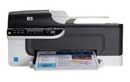 HP Officejet 4500 is one of the most successful printers from HP. However, like any other hardware device, this all-in-one printer, too, can sometimes behave erratically, or, worse, stop functioning completely.
More often than not, the root cause of HP Officejet 4500 errors is issues with its driver. While there are many things that can go wrong with your printer driver and consequently cause an error, usually, one or more of the following conditions cause HP Officejet 4500 driver issues:
- The required HP Officejet 4500 driver is missing
- You upgraded your Windows version and did not install a compatible printer driver
- You upgraded your HP Officejet 4500 printer without installing the latest driver or without uninstalling the old driver
- The installed HP Officejet 4500 driver, although correct, has become corrupt
Troubleshooting HP Officejet 4500 driver issues is relatively straightforward. All you need to do is locate the latest printer driver, download it, and install it. Read on to know how to do all this and more.
Download HP Officejet 4500 driver
To do this, you must perform the following steps in the order they are listed below:
- Launch your web browser and go to http://h10025.www1.hp.com/ewfrf/wc/softwareCategory?cc=uk&lc=en&dlc=en&product=3919448
- The drivers/software, if available, will be displayed in English. If the default language of your operating system is different, click Select a different language and follow the on-screen instructions.
- Select your Windows operating system from the drop-down menu, and then click the Next button.
- Expand Driver – Product Installation Software
- Click HP Officejet Basic Print and Scan Driver
- Read the details (if you want to) and click the required file (the driver file has an .exe file extension)
- Browse to the location where you want to store the driver file, and then click the Save button (the file is not likely to take more than a couple of seconds to download).
Install HP Officejet 4500 Driver
To install the HP Officejet 4500 driver, browse to the location where you have stored the downloaded driver file. Next, double-click it and follow the on-screen instructions. You may be prompted to restart Windows once the installation set-up is complete.
Common HP Officejet Updates
- HP Officejet 6700 Premium e-All-in-One
- HP Officejet 4252 All-in-One
- HP Officejet Lx
- HP Officejet 4500 All-in-One G510g
- HP Officejet J4680c All-in-One
- HP Officejet 7500A e-All-in-One E910a
- HP Officejet J3608 All-in-One
- HP Officejet 4355 All-in-One
- HP Officejet J4580 All-in-One
Fixing HP Officejet 4500 driver errors and other driver errors automatically
Driver Update Tool: the easiest way to resolve driver-related issues
Manufacturers regularly release new versions of their drivers. If you do not update your drivers regularly, you can experience a range of errors and issues. As there are hundreds of drivers installed on a PC, knowing when to update which drivers and updating them manually can be very tedious.
You can use a reliable, automatic driver update tool to solve driver issues and keep all your device drivers up-to-date
Lynn Jordan says
I have a desktop that is running windows8 and has 1tb hard drive in it and I am tryng to download a HP officejet pro 8600 printer but I can not seem to get it to download can you offer any suggestions. Thank you
mamadou ce says
i need your help for
aman says
hi my hp pr
anton uys says
I have trouble installing the scanner of my printer as I have a Windows 8 and would like to know what to do as it was working on my windows xp
Rosetta Mitchell says
i am having problems installing my printer
Zohar Dricker says
Hi
Paper stucked inside printer.
Pls advise
RGDS
Zohar D.
Mordechai Dessayur says
My HP Officejet 4500 does not print
apparently there is no more ink, but in order to change cartridges, I have to shut down.
I press the green button, it starts blinking and there is a sign which says:”shutting Down” which it does not.
Please tell me what to do, thanks in advance
fred says
The printer will not copy. It comes on and runs like it is copying but nothing comes out on the paper.
Scott Wrensch says
I bought this HP 4500 printer/scanner/fax and copy machine 6 mo ago. My problem is printer will not print. paper feeds and gets stuck
I called a support number and they want to charge me 200.00 to correct. that is not right! Where do I send back printer? store won’t take it back since I had it over 3 months.
frustrated in Wisconsin
Hector says
I have a Officejet 4500, have had it for about 4-yrs. since day one have had problems with it, in my opinion it is a piece of *****, …… paper always getting stuck, doesn’t always print off of computer, over prints,doesn’t print complete page, half one time, half next time, tec support sucks, too much ***** with hp printers ! … etc, a couple weeks ago it just plain stopped, what should I do with this piece of *****, ? … through it in the street ? …. feel free to post this comment, …. please do ! …..
babu says
hp 4500
Elli says
Printed a few documents. suddenly got an error message on printer “(Black) print cartridge incompatible. why? what went wrong?
jOSE says
I have a 4500 HP and I want to know how to print both side at onetime
Master Metis says
I have installed my Printer’s CD and my Laptop was stolen so I got a new PC and I’m trying to install the disl again it doesn’t allow me. Now I’m unable to scan files and documents, I need settings for this please help me be able to scan Doc
Florence says
I love technology, but honestly I am not very good at it. This site has really been a lifesaver for me, and the HP Officejet 4500 printer that was on seriously borrowed time!
erfan naqvi says
from last 2 days iam trying to download the drivers hp officejet 4500. but i am not able to find correct drivers wich is suitable for my laptop.i am using windows 7. can you please help me out.
DriverHelper says
erfan – you could use the free drivers scan (use the download link above) to find which exact drivers you need. you can then search for the drivers yourself or register the software to get automatic driver updates
Deborah Miller says
I’m running Windows 7 with an HP 4500…the solution to MOST of the issues I’m reading..is you are using the wrong driver…after the 4500 there is an extention…you need the “4500 G510a-f”..the “auto scan diagnose” option NEVER gives you this one- but it solves the issue!! Hope it helps!!
lanKan says
problem with officejet 4500 not printing – any ideas?
ahmad says
hello,
i have hp 4500 all in one, i download da drivers nd the printer is workin but scanner nd fax are off
thx for helpin
with kind regards
kadri
DriverAdvice says
what system are you running? Have these features ever worked or is this a new install?
lucky says
I need ( hp psc 2210 printer all in one ) scaner driver plz help me send me a link or driver
joyce greco says
I can print from the computer, but it will not alow me to make copies. Can you please help.
margot says
downloaded drivers, can’t scan. says ‘no scan options. pls consult device paperwork’ or something. was given the printer/fax/scanner/copier so do not have any manual.
Drivers help says
Hi margot – have you tried downloading the software (download link above) – you can run a free drivers scan and then use the info to search for drivers to see if still available, if not you may need to register and get the tool to update the drivers for you
Dan Block says
Same problem as “fred” above. My G510 printer stopped printing about a year ago. It acts and sounds normally, but nothing comes out printed on paper. Ink levels are ok. I have replaced the driver, done ALL the HP troubleshooting available, with no luck. I upgraded to Windows 10 with no luck either. Help!
Drivers help says
Hi dan – it sounds like it could be a problem with the ink pump. Can you try to print a test page without using the PC (this will rule out PC-related issues such as drivers) – you may need to check your manual for this but it may be:
– Press and hold Cancel button
– While still pressing cancel, press the OK button
– A self-test report should print
Kenny Garcia says
I upgraded my computer to windows 10 and my scanner stopped working , i already uninstalled and reinstall the driver and the update for windows 10 and the scanner still do not work , any help would be greatly appreciated.
abenezer says
i need the driver how do i found it